개요
커뮤니케이션 기술이 빠르게 발전하는 가운데, OpenAI Whisper 모델을 비롯한 최신 기술의 등장으로 다국어 음성-텍스트 변환의 정확도와 접근성이 크게 향상되었습니다. 그러나 정확도 측면에서는 여전히 개선의 여지가 남아 있습니다. 본 연구에서는 베트남어와 일본어에 초점을 맞추어 자동 음성 인식(ASR) 모델의 성능 향상에 주력했습니다.
성능 평가에는 표준 지표를 사용했습니다. 베트남어에는 단어 오류율(WER), 일본어에는 문자 오류율(CER)을 적용했습니다.
주요 결과:
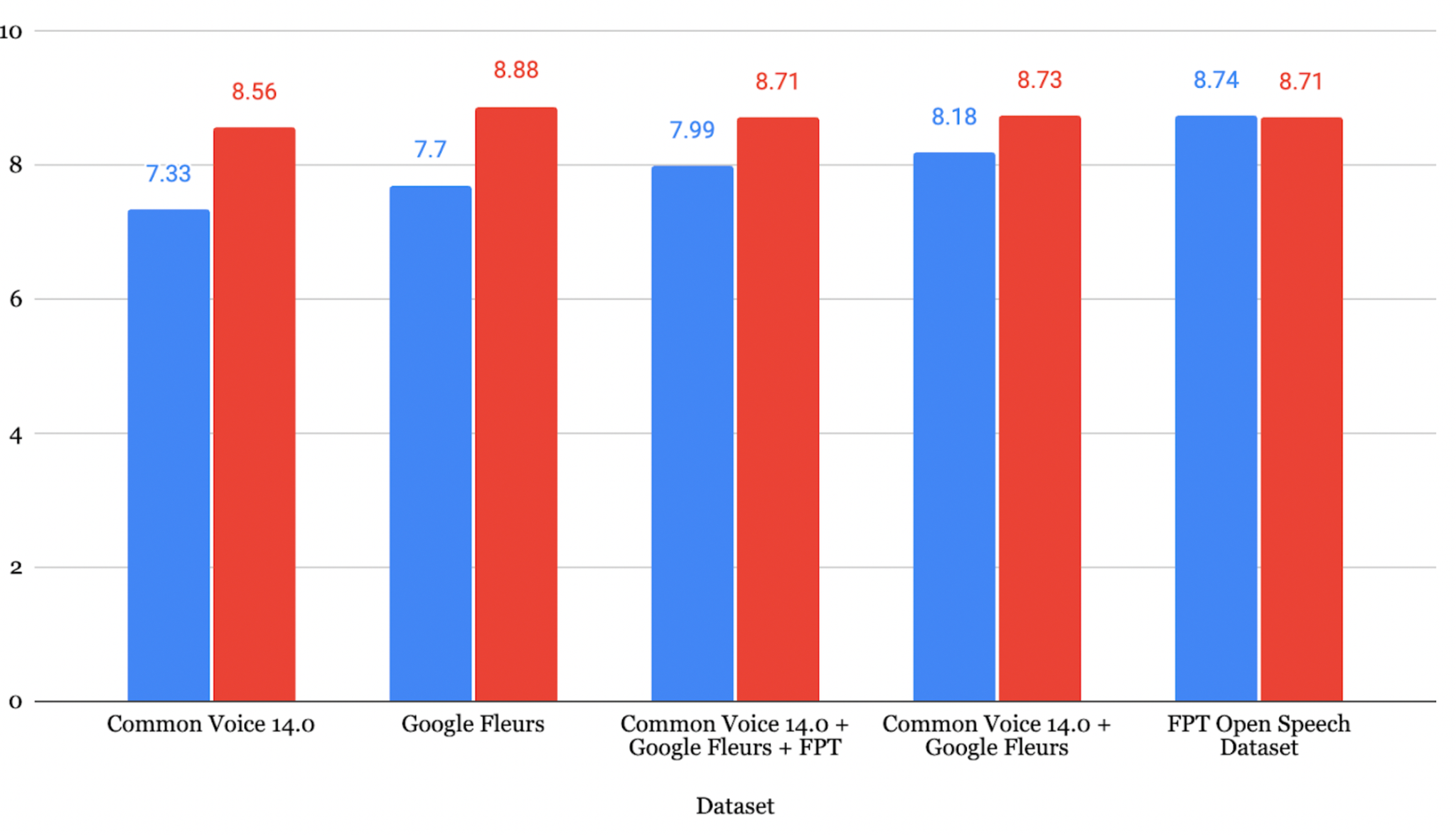
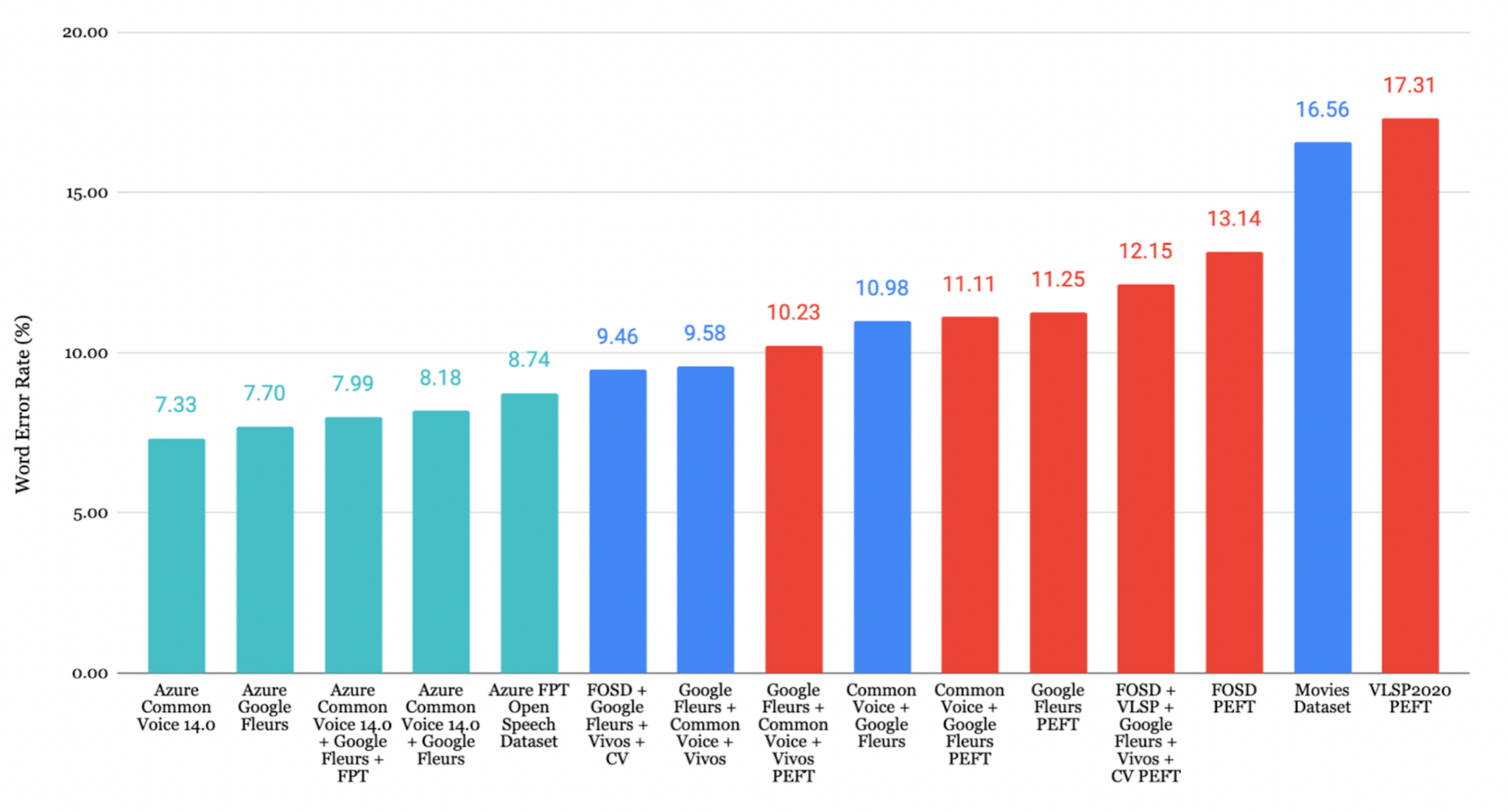
- 베트남어 (FOSD + Common Voice + Google Fleurs + Vivos): WER 9.46%
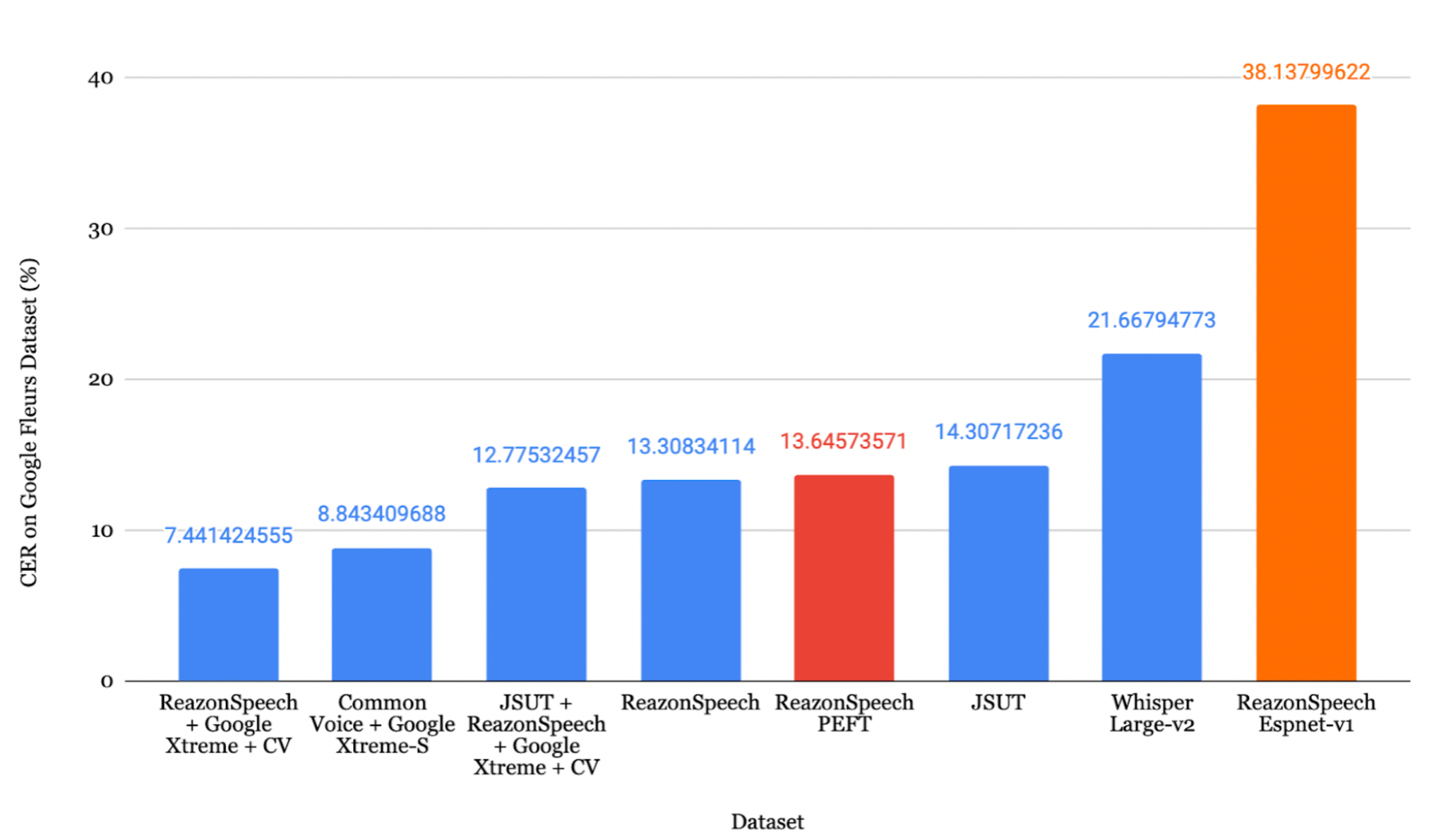
- 일본어 (ReazonSpeech + Common Voice + Google Fleurs): CER 8.15%
목차
- 배경
- 환경 설정
- 데이터셋 로드
- 데이터 전처리
- 학습
- 파라미터 효율적 파인튜닝
- 결과
- 평가
- Azure Speech Studio
- 결론
1. 배경
현대 사회에서 커뮤니케이션과 기술은 필수적이지만, 접근성, 포용성, 효율적인 지식 공유 측면에서 여전히 많은 과제가 존재합니다. 자동 음성 인식(ASR)의 발전은 특히 온라인 회의에서 사람과 컴퓨터 간의 상호작용을 크게 개선합니다.
ASR은 음성 신호를 해당 텍스트로 변환하는 기술입니다. 최근 대규모 음성 데이터셋과 전사 데이터의 접근성이 높아지면서, 다양한 기업에서 이 분야에 관심을 기울이고 있습니다.
OpenAI Whisper는 Transformer 기반의 인코더-디코더 모델로, sequence-to-sequence 아키텍처로 설계되었습니다. 오디오 스펙트로그램 특징을 입력으로 받아 텍스트 토큰 시퀀스로 변환하며, 다음과 같은 과정을 거칩니다.
- 특징 추출기가 원시 오디오를 log-Mel 스펙트로그램으로 변환
- Transformer 인코더가 인코더 은닉 상태 시퀀스를 생성
- 디코더가 cross-attention 메커니즘을 사용하여 텍스트 토큰을 예측
2. 환경 설정
Whisper를 파인튜닝하는 방법은 크게 두 가지입니다. Google Colab을 활용하는 방법과 로컬 PC에서 코드를 실행하는 방법이 있습니다.
필수 패키지
 1
 2
 3
 4
 5
 6
 7
 8
 9
10
11
| python -m pip install -U pip
pip install evaluate pandas numpy huggingface_hub pydub tqdm spacy ginza audiomentations
pip install torch torchvision torchaudio --index-url https://download.pytorch.org/whl/cu118
pip install datasets>=2.6.1
pip install git+https://github.com/huggingface/transformers
pip install librosa
pip install evaluate>=0.30
pip install jiwer
pip install gradio
pip install -q bitsandbytes datasets accelerate loralib
pip install -q git+https://github.com/huggingface/transformers.git@main git+https://github.com/huggingface/peft.git@main
|
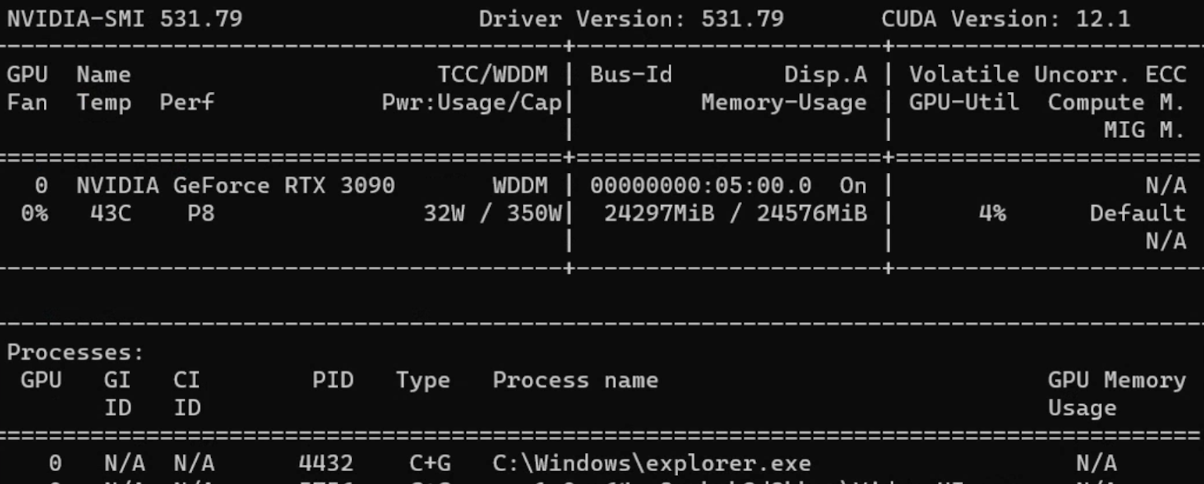
참고: 본 실험에서는 Windows 11 Pro, AMD Ryzen 7 3700X 8코어 프로세서, 80GB RAM, GeForce RTX 3090 GPU를 탑재한 PC를 사용했습니다.
3. 데이터셋 로드
방법 1: Hugging Face 활용
 1
 2
 3
 4
 5
 6
 7
 8
 9
10
11
12
13
14
15
| from datasets import load_dataset, DatasetDict
common_voice = DatasetDict()
common_voice["train"] = load_dataset(
"mozilla-foundation/common_voice_11_0", "ja",
split="train+validation", use_auth_token=True
)
common_voice["test"] = load_dataset(
"mozilla-foundation/common_voice_11_0", "ja",
split="test", use_auth_token=True
)
common_voice = common_voice.remove_columns([
"accent", "age", "client_id", "down_votes",
"gender", "locale", "path", "segment", "up_votes"
])
|
방법 2: 수동 데이터셋 준비
 1
 2
 3
 4
 5
 6
 7
 8
 9
10
11
12
13
14
15
16
17
18
19
20
21
| import os, csv, codecs
def text_change_csv(input_path, output_path):
file_csv = os.path.splitext(output_path)[0] + ".csv"
output_dir = os.path.dirname(input_path)
output_file = os.path.join(output_dir, file_csv)
encodings = ["utf-8", "latin-1"]
for encoding in encodings:
try:
with open(input_path, 'r', encoding=encoding) as rf:
with codecs.open(output_file, 'w', encoding=encoding, errors='replace') as wf:
readfile = rf.readlines()
for read_text in readfile:
read_text = read_text.split('|')
writer = csv.writer(wf, delimiter=',')
writer.writerow(read_text)
print(f"CSV has been created using encoding: {encoding}")
return True
except UnicodeDecodeError:
continue
|
사용 데이터셋
| 데이터셋 | 언어 | 사용 방법 | 음성 시간 |
|---|
| Common Voice 13.0 | 베트남어, 일본어 | Hugging Face | 19시간(VN), 10시간(JP) |
| Google Fleurs | 베트남어, 일본어 | Hugging Face | 11시간(VN), 8시간(JP) |
| Vivos | 베트남어 | Hugging Face | 15시간 |
| FPT Open Speech Dataset | 베트남어 | 다운로드 후 추출 | 30시간 |
| VLSP2020 | 베트남어 | 다운로드 후 추출 | 100시간 |
| ReazonSpeech | 일본어 | Hugging Face | 5시간 |
| JSUT | 일본어 | 다운로드 후 추출 | 10시간 |
| JVS | 일본어 | 다운로드 후 추출 | 30시간 |
4. 데이터 전처리
데이터 증강
 1
 2
 3
 4
 5
 6
 7
 8
 9
10
11
12
13
14
15
16
17
| from audiomentations import Compose, AddGaussianNoise, TimeStretch, PitchShift
common_voice = common_voice.cast_column("audio", Audio(sampling_rate=16000))
augment_waveform = Compose([
AddGaussianNoise(min_amplitude=0.005, max_amplitude=0.015, p=0.2),
TimeStretch(min_rate=0.8, max_rate=1.25, p=0.2, leave_length_unchanged=False),
PitchShift(min_semitones=-4, max_semitones=4, p=0.2)
])
def augment_dataset(batch):
audio = batch["audio"]["array"]
augmented_audio = augment_waveform(samples=audio, sample_rate=16000)
batch["audio"]["array"] = augmented_audio
return batch
common_voice['train'] = common_voice['train'].map(augment_dataset, keep_in_memory=True)
|
전사 정규화
 1
 2
 3
 4
 5
 6
 7
 8
 9
10
11
12
13
14
| import string
def remove_punctuation(sentence):
translator = str.maketrans('', '', string.punctuation)
modified_sentence = sentence.translate(translator)
return modified_sentence
def fix_sentence(sentence):
transcription = sentence
if transcription.startswith('"') and transcription.endswith('"'):
transcription = transcription[1:-1]
transcription = remove_punctuation(transcription)
transcription = transcription.lower()
return transcription
|
Whisper용 데이터셋 준비
 1
 2
 3
 4
 5
 6
 7
 8
 9
10
11
12
13
14
15
16
17
18
19
| def prepare_dataset(batch):
audio = batch["audio"]
batch["input_features"] = processor.feature_extractor(
audio["array"], sampling_rate=audio["sampling_rate"]
).input_features[0]
batch["input_length"] = len(audio["array"]) / audio["sampling_rate"]
transcription = fix_sentence(batch["transcription"])
batch["labels"] = processor.tokenizer(
transcription, max_length=225, truncation=True
).input_ids
return batch
common_voice = common_voice.map(
prepare_dataset,
remove_columns=common_voice.column_names['train'],
num_proc=1,
keep_in_memory=True
)
|
5. 학습
Data Collator
 1
 2
 3
 4
 5
 6
 7
 8
 9
10
11
12
13
14
15
16
17
18
19
20
21
22
23
24
| import torch
from dataclasses import dataclass
from typing import Any, Dict, List, Union
@dataclass
class DataCollatorSpeechSeq2SeqWithPadding:
processor: Any
def __call__(self, features: List[Dict[str, Union[List[int], torch.Tensor]]]) -> Dict[str, torch.Tensor]:
input_features = [{"input_features": feature["input_features"]} for feature in features]
batch = self.processor.feature_extractor.pad(input_features, return_tensors="pt")
label_features = [{"input_ids": feature["labels"]} for feature in features]
labels_batch = self.processor.tokenizer.pad(label_features, return_tensors="pt")
labels = labels_batch["input_ids"].masked_fill(labels_batch.attention_mask.ne(1), -100)
if (labels[:, 0] == self.processor.tokenizer.bos_token_id).all().cpu().item():
labels = labels[:, 1:]
batch["labels"] = labels
return batch
data_collator = DataCollatorSpeechSeq2SeqWithPadding(processor=processor)
|
평가 지표 (베트남어 - WER)
 1
 2
 3
 4
 5
 6
 7
 8
 9
10
11
12
13
14
| import evaluate
metric = evaluate.load("wer")
def compute_metrics(pred):
pred_ids = pred.predictions
label_ids = pred.label_ids
label_ids[label_ids == -100] = tokenizer.pad_token_id
pred_str = tokenizer.batch_decode(pred_ids, skip_special_tokens=True)
label_str = tokenizer.batch_decode(label_ids, skip_special_tokens=True)
wer = 100 * metric.compute(predictions=pred_str, references=label_str)
return {"wer": wer}
|
평가 지표 (일본어 - CER)
 1
 2
 3
 4
 5
 6
 7
 8
 9
10
11
12
13
14
15
16
17
18
19
| import spacy, ginza
nlp = spacy.load("ja_ginza")
ginza.set_split_mode(nlp, "C")
def compute_metrics(pred):
pred_ids = pred.predictions
label_ids = pred.label_ids
label_ids[label_ids == -100] = processor.tokenizer.pad_token_id
pred_str = processor.tokenizer.batch_decode(pred_ids, skip_special_tokens=True)
label_str = processor.tokenizer.batch_decode(label_ids, skip_special_tokens=True)
# 일본어 텍스트를 적절히 토큰화하여 평가
pred_str = [" ".join([str(i) for i in nlp(j)]) for j in pred_str]
label_str = [" ".join([str(i) for i in nlp(j)]) for j in label_str]
wer = 100 * metric.compute(predictions=pred_str, references=label_str)
return {"wer": wer}
|
학습 하이퍼파라미터
 1
 2
 3
 4
 5
 6
 7
 8
 9
10
11
12
13
14
15
16
17
18
19
20
21
22
23
24
25
26
27
28
| from transformers import Seq2SeqTrainingArguments
model.config.dropout = 0.05
training_args = Seq2SeqTrainingArguments(
output_dir="./whisper-fine-tuned",
per_device_train_batch_size=16,
gradient_accumulation_steps=1,
learning_rate=1e-6,
lr_scheduler_type='linear',
optim="adamw_bnb_8bit",
warmup_steps=200,
num_train_epochs=5,
gradient_checkpointing=True,
evaluation_strategy="steps",
fp16=True,
per_device_eval_batch_size=8,
predict_with_generate=True,
generation_max_length=255,
eval_steps=500,
logging_steps=500,
report_to=["tensorboard"],
load_best_model_at_end=True,
metric_for_best_model="wer",
greater_is_better=False,
push_to_hub=False,
save_total_limit=1
)
|
팁: 주요 학습 파라미터 안내:
- learning_rate: 1e-5 또는 1e-6이 가장 효과적
- warmup_steps: 전체 스텝 수의 약 10%로 설정
- per_device_train_batch_size: GPU 용량에 따라 설정 (RTX 3090에서는 16)
- dropout: 과적합 방지를 위해 0.05 또는 0.10 사용
6. 파라미터 효율적 파인튜닝 (PEFT)
PEFT는 전체 파라미터의 1%만 학습하면서도 동등한 성능을 달성합니다.
| 일반 파인튜닝 | 파라미터 효율적 파인튜닝 |
|---|
| 학습 시간이 짧음 | 학습 시간이 김 |
| 대규모 계산 자원 필요 | 적은 계산 자원으로 가능 |
| 전체 모델을 재학습 | 일부 파라미터만 수정 |
| 과적합 위험이 높음 | 과적합 위험이 낮음 |
LoRA 설정
 1
 2
 3
 4
 5
 6
 7
 8
 9
10
11
12
13
14
15
16
17
18
19
20
21
22
23
| from transformers import WhisperForConditionalGeneration, prepare_model_for_int8_training
from peft import LoraConfig, get_peft_model
model = WhisperForConditionalGeneration.from_pretrained(
model_name_or_path, load_in_8bit=True, device_map="auto"
)
model = prepare_model_for_int8_training(model)
def make_inputs_require_grad(module, input, output):
output.requires_grad_(True)
model.model.encoder.conv1.register_forward_hook(make_inputs_require_grad)
config = LoraConfig(
r=32,
lora_alpha=64,
target_modules=["q_proj", "v_proj"],
lora_dropout=0.05,
bias="none"
)
model = get_peft_model(model, config)
model.print_trainable_parameters()
# Output: trainable params: 15728640 || all params: 1559033600 || trainable%: 1.01%
|
7. 결과
베트남어 결과
FOSD + Google Fleurs + Vivos + CV 데이터셋으로 파인튜닝한 모델이 가장 낮은 WER **9.46%**를 달성했습니다.
일본어 결과
JSUT + ReazonSpeech + Google Xtreme + CV 데이터셋으로 파인튜닝한 모델이 가장 낮은 CER **8.15%**를 달성했습니다.
최적화 손실 곡선
8. 평가
베트남어 평가
평가 대상 데이터셋 가운데 Google Fleurs + Common Voice + Vivos 조합이 CER **7.84%**로 가장 높은 전사 정확도를 기록했습니다.
일본어 평가
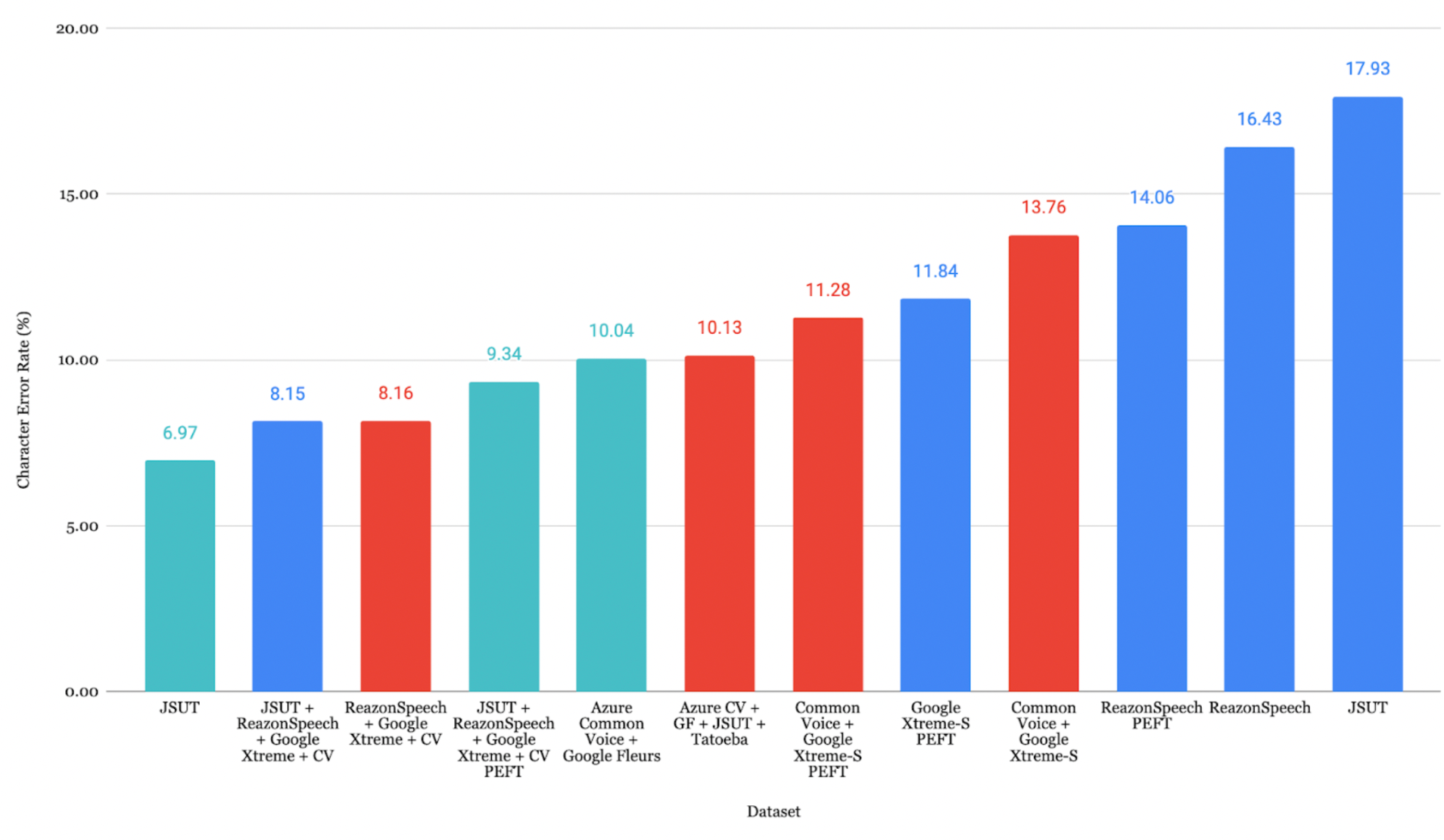
ReazonSpeech + Google Xtreme + CV 조합이 CER **7.44%**로 가장 낮은 오류율을 달성했습니다.
Faster-Whisper 변환
1
2
3
4
5
6
7
8
| from ctranslate2.converters import TransformersConverter
model_id = "./whisper-fine-tuned/checkpoint-5000"
output_dir = "whisper-ct2"
converter = TransformersConverter(model_id, load_as_float16=True)
converter.convert(output_dir, quantization="float16")
model = WhisperModel(output_dir, device="cuda", compute_type="float16")
|
참고: Faster Whisper는 기존 파인튜닝된 Whisper와 동등한 정확도를 유지하면서 추론 속도를 약 40% 향상시킵니다.
9. Azure Speech Studio
Azure Speech Studio는 ASR 모델 파인튜닝을 위한 대안적 접근 방식을 제공합니다.
Azure를 이용한 전사
 1
 2
 3
 4
 5
 6
 7
 8
 9
10
11
12
13
14
15
16
17
18
19
20
21
22
23
24
25
26
27
28
| import os, evaluate
from azure.cognitiveservices.speech import SpeechConfig, SpeechRecognizer, AudioConfig
subscription_key = "your_subscription_key"
location = "japaneast"
endpoint = "your_endpoint"
config = SpeechConfig(subscription=subscription_key, region=location)
config.endpoint_id = endpoint
speech_config = SpeechConfig(
subscription=subscription_key,
region=location,
speech_recognition_language="ja-JP"
)
predictions = []
for root, _, files in os.walk(wav_base_path):
for file_name in files:
if file_name.endswith(".wav"):
audio_file_path = os.path.join(root, file_name)
audio_config = AudioConfig(filename=audio_file_path)
speech_recognizer = SpeechRecognizer(
speech_config=speech_config,
audio_config=audio_config
)
result = speech_recognizer.recognize_once()
if result.text:
predictions.append(result.text)
|
Azure 결과
베트남어: Common Voice 14.0으로 학습한 모델이 WER 7.33% 달성
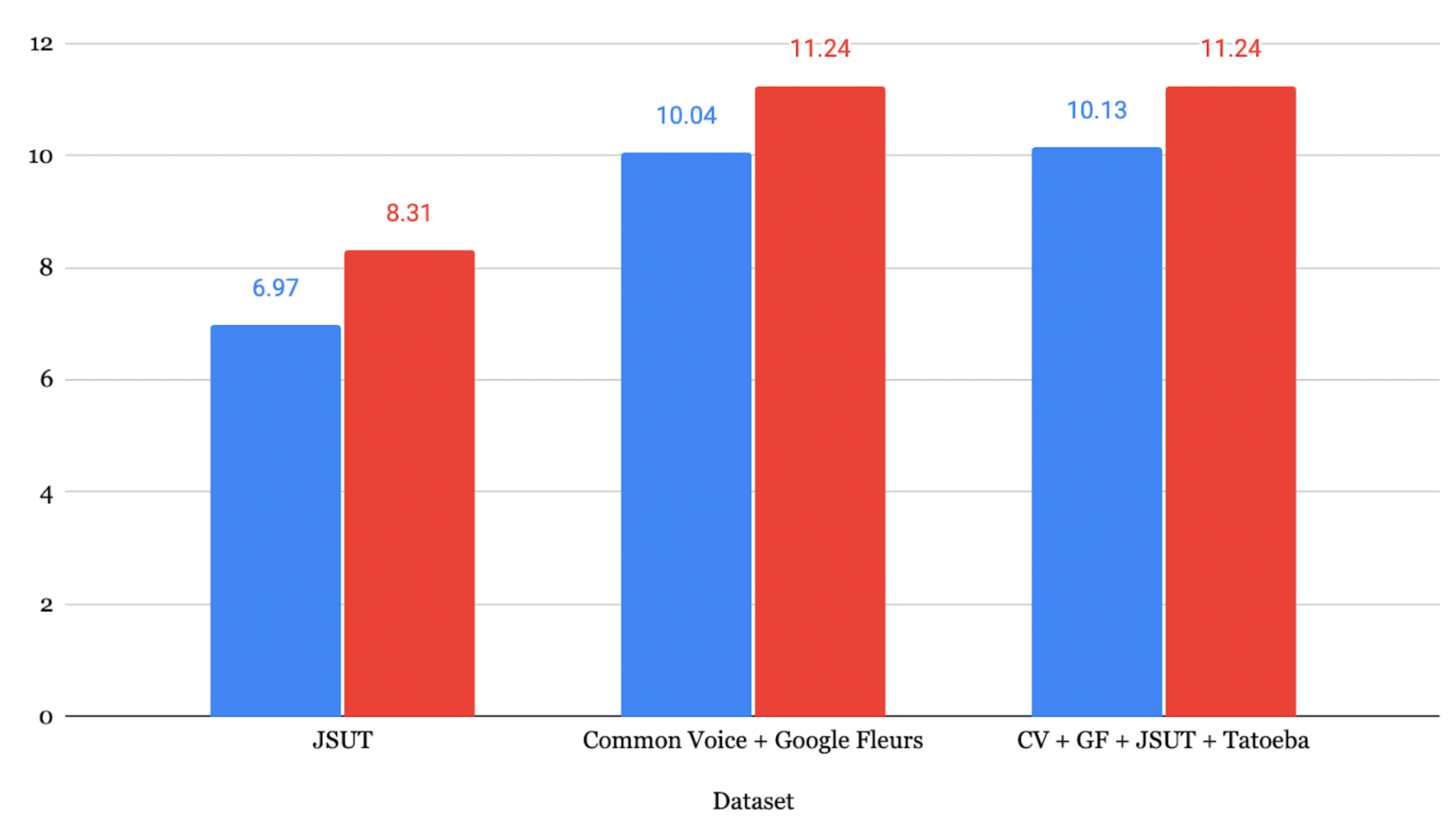
일본어: JSUT로 학습한 모델이 CER 6.97% 달성
주의: Azure Speech Studio가 학습 시 더 낮은 WER을 보일 수 있지만, 실제 운영 환경의 다양하고 복잡한 오디오에 대해서는 Whisper가 더 나은 평가 결과를 보이는 경향이 있습니다.
10. 결론
Whisper ASR 모델의 파인튜닝은 성능을 효과적으로 향상시키는 기법임이 확인되었습니다. 주요 발견 사항은 다음과 같습니다.
- DeepL은 중국어에서 영어로의 번역에서 가장 높은 정확도를 보임
- 파인튜닝을 통해 일관된 성능 향상 달성 (베트남어 WER 7.33-12.15%, 일본어 CER 8.15-17.93%)
- 데이터 증강은 audiomentations 라이브러리를 통해 유의미한 다양성 확보 가능
- 데이터셋 품질이 핵심: 데이터 양, 오디오 선명도, 주제 다양성이 모두 성능에 영향
- 실제 운영 환경에서 Whisper가 더 우수: 처음 보는 데이터에 대해 Azure보다 나은 성능 발휘
참고 문헌
- Radford, A., et al. (2022). Robust speech recognition via large-scale weak supervision. arXiv:2212.04356
- Ardila, R., et al. (2020). Common Voice: A Massively-Multilingual Speech Corpus. arXiv:1912.06670
- Conneau, A., et al. (2022). FLEURS: Few-Shot Learning Evaluation of Universal Representations of Speech. arXiv:2205.12446
- Gandhi, S. (2022). Fine-Tune Whisper for Multilingual ASR with Transformers. Hugging Face Blog
- Mangrulkar, S. & Paul, S. Parameter-Efficient Fine-Tuning Using PEFT. Hugging Face Blog