How VoicePing engineered Bilingual Mode for automatic, low-latency language switching inside a single WebSocket stream powered by customized Whisper V2 models.
VoicePing now runs bilingual transcripts in production meetings where Japanese, English, Mandarin, Cantonese, Korean, and Vietnamese flow together mid-sentence. Users just want transcription and translation to stay seamless no matter how often they code-switch. This article explains how we engineered Bilingual Mode—automatic, low-latency language switching inside a single WebSocket stream powered by customized Whisper V2 models.
Table of Contents
- 1. The Monolingual Baseline
- 2. Why “Bilingual Mode” Is Mandatory
- 3. The Naïve Fix: External Language Detection (And Why It Failed)
- 4. The Breakthrough: Let Whisper Tell Us the Language
- 5. Stabilizing Code-Switch Boundaries
- 6. Stabilizing Short Audio with Universal Padding
- 7. Operating Constraints: GPUs, MPS, and Concurrency
- 8. Conclusion
- References
1. The Monolingual Baseline
We started from a conventional real-time ASR stack:
- Client streams 16 kHz PCM audio.
- VAD chunks audio into sliding windows (~X s with configurable overlap).
- A Whisper V2 derivative decodes with a fixed
language=ja. - Post-processing deduplicates partial hypotheses, applies text correction, and streams updates over WebSocket.
This sliding-window + concatenation pipeline mirrors the Streaming Whisper approach described in “Streaming Whisper: Enhanced Streaming Speech Recognition” (https://arxiv.org/abs/2307.14743) and gave us a stable baseline before we layered bilingual capabilities on top.
Diagram 1: Monolingual baseline (single fixed language)
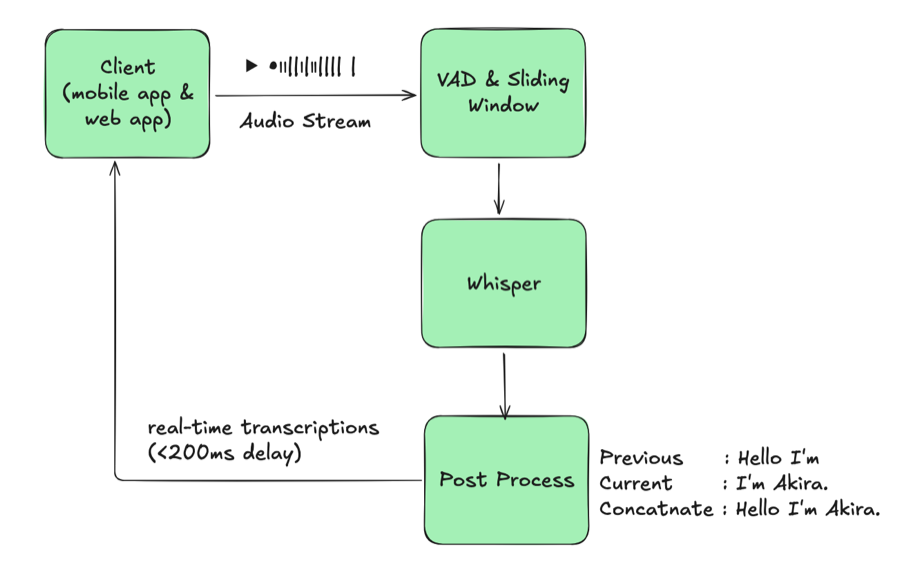
This architecture assumes the session language never changes. Buffers, phrase
biasing dictionaries, and message sessions all key off that single language.
Once code-switching entered the picture, the system collapsed: if a customer
shifted from Japanese to English mid-call while the server stayed locked to
ja, Whisper produced garbled or empty text. Fixing it meant a human had to
disconnect the WebSocket, reconfigure the session language, and reconnect—every
time the speaker changed languages. That manual loop and forced reconnect cycle
became the bottleneck of the entire architecture.
2. Why “Bilingual Mode” Is Mandatory
In real meetings, language changes aren’t hypothetical edge cases. A Japanese speaker might present, an English-speaking colleague jumps in, and a Mandarin-speaking stakeholder asks a follow-up. At events, hosts stay in Japanese while attendees queue up questions in English. Our original single-language system shattered the conversation flow: every switch forced someone to stop, reconfigure the session, and reconnect, stretching meetings and driving up coordination costs.
Teams kept asking for one simple behavior: “Just detect whichever of our two languages is being used and keep transcribing (and translating) without us touching anything.” That straightforward request became the north star for Bilingual Mode.
“Why not just let Whisper stay fully multilingual?” Because production users expect predictable outputs. When Whisper runs unconstrained it happily emits any of its 90+ languages, especially on short, noisy real-time buffers. In testing we saw JA/EN meetings suddenly produce Spanish or Russian tokens just because a speaker mumbled or a cough resembled another language’s phonemes. That chaos is barely manageable in batch mode where you can re-run longer clips, but it’s a show-stopper for live transcripts—users need to select their two supported languages so downstream translation, UI, and QA can trust the stream.
To deliver it, we translated the ask into concrete requirements:
- Real-time: Switching overhead must stay under 200 ms, otherwise UI stalls.
- Automatic: No human-in-the-loop to flip toggles mid-meeting.
- Constrained pair: Exactly two configured languages (currently JA/EN/zh-Hans/zh-Hant/KO/VI combinations) per stream, so UX stays predictable.
- Stable sessions: False switches are worse than misses; the transcript must not thrash between languages on every filler word.
With those constraints, Bilingual Mode moved from a “nice to have” to a non-negotiable system capability.
Demo: Bilingual Mode in Action
3. The Naïve Fix: External Language Detection (And Why It Failed)
Our first prototype inserted a language-ID model ahead of Whisper:
Diagram 2: Naïve multilingual with external LID
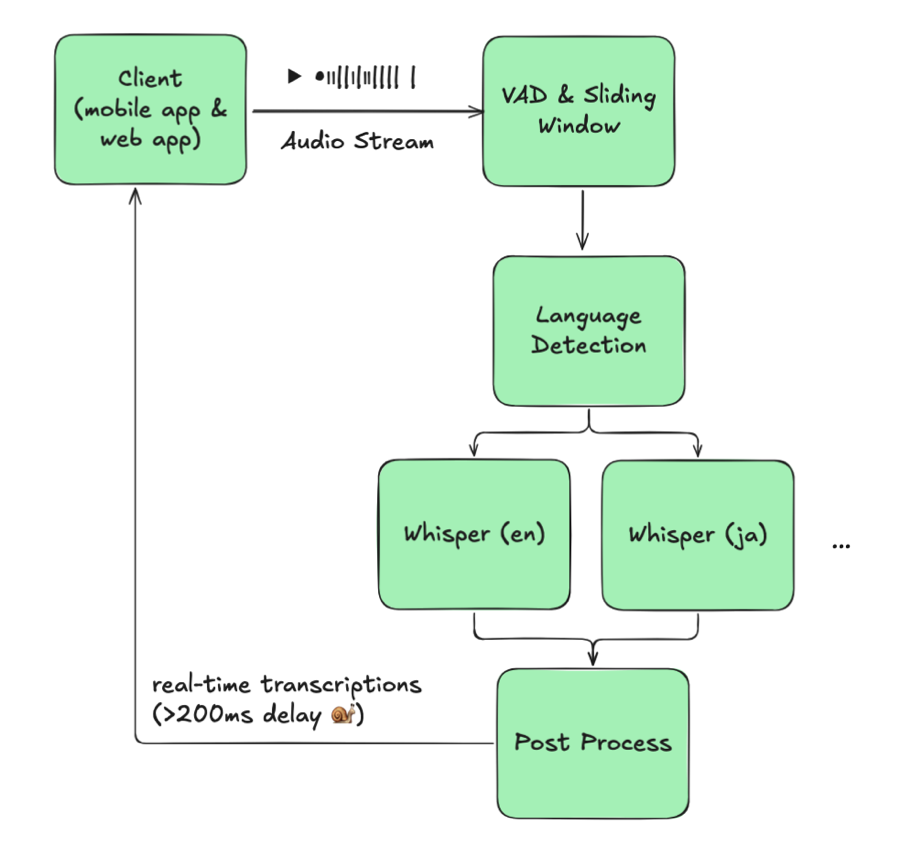
The theory was simple: detect the language for each buffer, then feed the buffer into a monolingual Whisper instance. Reality disagreed.
The critical issue was a trade-off we couldn’t win: lowering detection frequency missed switches, but raising it added roughly 100 ms latency and doubled GPU usage. Accuracy and responsiveness couldn’t coexist.
Even if we accepted that trade-off, other blockers stacked up. Each language needed its own Whisper instance, and our usage wasn’t evenly distributed—JA/EN dominated, leaving KO or VI models mostly idle while still occupying GPUs. The architecture simply didn’t scale.
We scrapped this branch after field tests showed worse latency and accuracy than the monolingual baseline.
4. The Breakthrough: Let Whisper Tell Us the Language
The weakest link in the previous design was the external language detector. After digging through Whisper internals, we discovered the model already exposes the signal we needed, we just had to use it correctly.
4.1 Whisper-native language detection
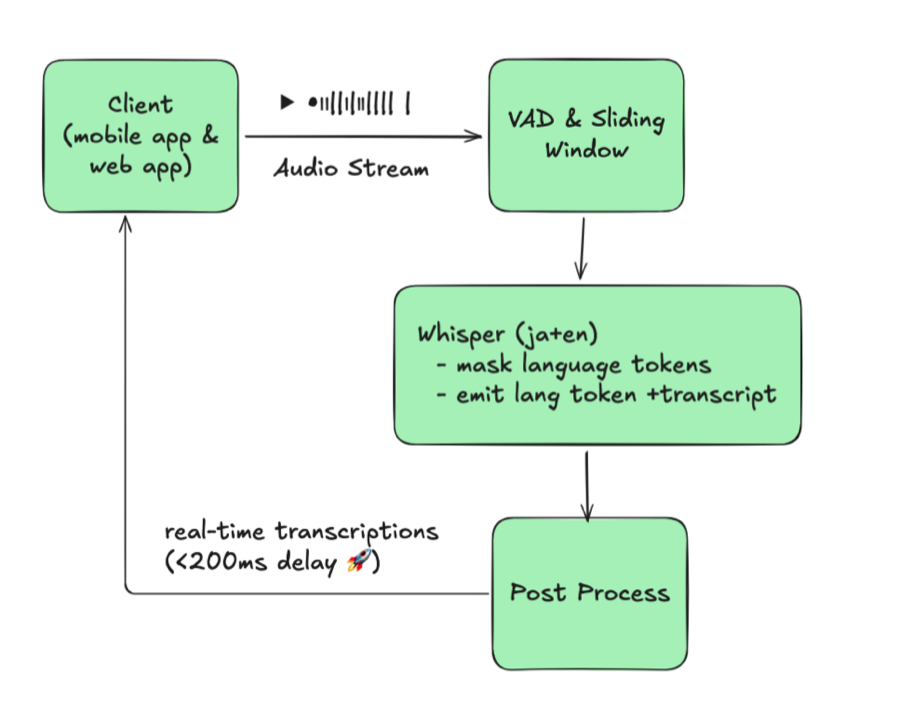
Whisper emits a language token at decoder position 1 (<|ja|>, <|en|>, etc.).
By default, Whisper can decode dozens of languages, but in production we
previously forced a single language for stability. By intercepting the language
token and constraining its logits, we can let one Whisper model stay
multilingual without sacrificing accuracy:
- Tap the language token: We intercept the first token from each beam, decode it, and treat it as the detected language.
- Constrain allowed languages: We mask logits so only our configured pair
(e.g., JA/EN) can appear at position 1. This prevents random detections like
<|ru|>when audio is noisy.
| |
With those constraints, a single Whisper inference yields both the transcription and the language code. No extra models, no routing, just one pass per audio window.
4.2 Architecture with Whisper-native detection
Diagram 3: Whisper-native language detection
This layout looks almost identical to the monolingual baseline, except Whisper now handles two languages in a single session. One model serves both languages, so we no longer spin up separate JA/EN/KO instances or juggle routing. Compared to the naive design, we eliminated the language-ID stage entirely, removed per-language model duplication, and kept latency flat.
5. Stabilizing Code-Switch Boundaries
Whisper now outputs the detected language token, but issuing a switch on every token would thrash the transcript. In real conversations, language shifts happen gradually—fillers, hesitations, and mixed words appear before the speaker fully changes languages. Without guardrails, the output looked like this:
| |
The recognizer bounced between JA and EN every few frames, producing interleaved text that’s useless for readers and downstream systems. We first added hysteresis so a language switch only becomes official after several consecutive frames emit the same language token above a confidence threshold; the noisy “I / いあ / I am” bursts disappear under that rule.
Short-text resolution was the biggest stabilization lever. Any fragment shorter than six characters now flows through a loose set of heuristics that check for Japanese kana, obvious English letters, unique Korean hangul, or Vietnamese markers. Japanese and Chinese both use kanji, so the rule is intentionally soft; if the signals remain ambiguous we simply fall back to the previously confirmed language rather than flip-flopping.
| |
That simple tweak prevents fillers like “um” or “えー” from toggling the session repeatedly.
Once the system commits to a new language, we finalize the existing partial transcript, kick off any correction jobs, reset Whisper’s buffers, and start a fresh session/message ID. That hard boundary keeps JA and EN text separated cleanly for downstream translation and analytics. Finally, we lean on VAD-derived silence windows to flush buffered text during natural pauses so we never split a word mid-utterance.
With these layers in place, code-switches now look like intentional handoffs rather than scrambled fragments, and downstream translation/search stays reliable.
6. Stabilizing Short Audio with Universal Padding
Short buffers are notoriously unstable: Whisper hallucinates and the language token can flip randomly. Our fix was counterintuitive—prepend a language-neutral padding clip (“Okay, bye bye.”) before sending the buffer to the model. The padding audio is long enough to anchor the decoder yet phonetically neutral across languages, we only insert it when the captured audio is shorter than our configurable cutoff (a few seconds in our case) so longer utterances remain untouched, and because the clip is constant the beam search quickly learns to ignore it while the language token gains enough context to stay stable.
| |
Padding short clips this way dramatically reduces hallucinations for mixed-language and other short-audio segments.
7. Operating Constraints: GPUs, MPS, and Concurrency
Multi-ASR only matters if it runs at scale, so we deploy on consumer RTX-series GPUs and lean on CUDA Multi-Process Service to keep inference pipelines saturated.
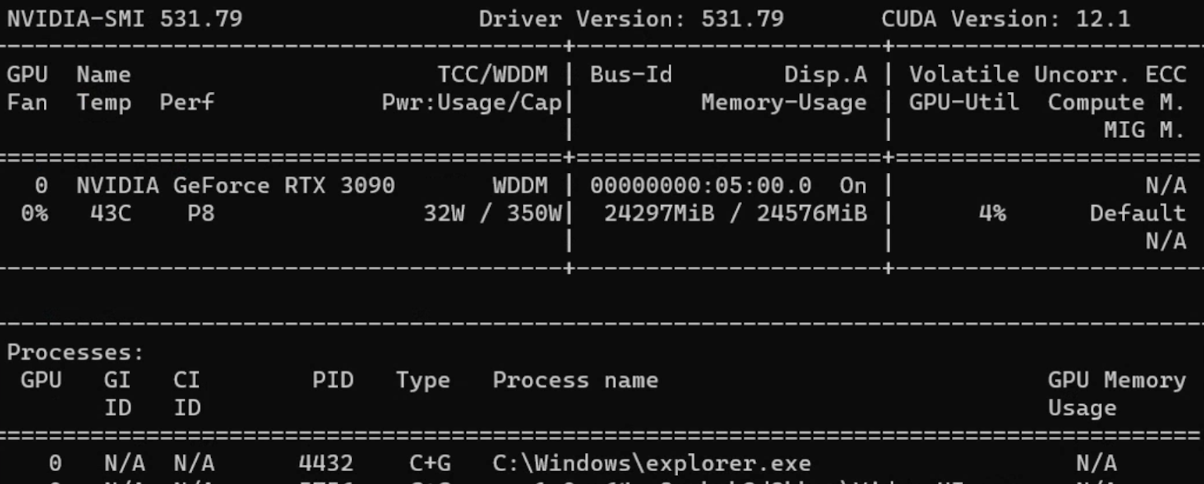
On a typical RTX 5090, three Whisper V2 workers (roughly 2 GB each, ~6–7 GB total) share the card’s ~30 GB of memory, so VRAM is never the limiter; the CUDA cores are.
In practice that RTX 5090 setup handles roughly 20–30 active audio streams while keeping end-to-end latency near 100 ms. Pushing a fourth worker technically fits in memory but drives latency well past real-time thresholds, so the CUDA cores set our capacity ceiling.
8. Conclusion
Today the system delivers sub-200 ms latency even when code-switching mid-utterance and predictable on-prem costs because we run tuned Whisper V2 models ourselves.
The current deployment is optimized for two languages per stream; extending beyond that will require UI and policy changes, so it’s on the roadmap rather than in production.
Next, we’re experimenting with TensorRT and VLLM-style inference for additional latency cuts and preparing a deep dive on multilingual phrase biasing. If you operate in bilingual or code-switch-heavy environments, read the language token straight from your ASR model—you might already have the signal you need.
References
Streaming Whisper: Enhanced Streaming Speech Recognition https://arxiv.org/abs/2307.14743
Main projects we studied while building Bilingual Mode:
SimulStreaming https://github.com/ufal/SimulStreaming
Whisper Streaming https://github.com/ufal/whisper_streaming
WhisperLiveKit https://github.com/QuentinFuxa/WhisperLiveKit
We initially explored WhisperLiveKit + streaming Sortformer, hoping diarization would reduce how often we needed to infer language tokens. In practice it required running both Sortformer and our own language detection, the latency gain was negligible, and Sortformer’s aggressiveness made it unusable for our meetings.
NVIDIA Nemotron Speech ASR (newer real-time ASR we haven’t tried yet) https://huggingface.co/blog/nvidia/nemotron-speech-asr-scaling-voice-agents