In this article
If everyone already has paid Teams and push-to-talk fits the work, start by trying Walkie Talkie. If conversations must remain available as text, compare the recording plans in Buddycom, BONX WORK and LINE WORKS Roger.
This guide is for deployment in shops, warehouses, hotels and care facilities in Japan. Compare uses and plans , six evaluation criteria and ten-person costs , then use each assessment to decide what to trial and what would rule it out. Article order is not a performance ranking. Prices, contracts and store links refer to Japan; translation does not imply the same availability or terms elsewhere.
Specifications, prices and public reviews were checked on November 11, 2026. We reviewed official documentation and public screens, not delay or audio quality under identical field conditions. For dedicated devices, see the six-radio comparison . Documentary screenshots retain the Japanese product interfaces with translated captions; videos retain their original language and publication dates.
Start with required records and existing workplace tools
Walkie-talkie apps send speech to connected members without waiting for someone to answer a phone call. Installing an app alone does not connect everybody: groups, permissions and device settings must be configured.
| Service | Use to consider | Core functions | Candidate plan / record conditions |
|---|---|---|---|
| 1. Buddycom | Combine group calls and conversation history for field work | One-way/two-way calls and audio replay; higher tiers add transcription and translation | Talk Enterprise for transcription and one-month history. Speech-to-text: ten hours/person/month; exceeding it may require a fee discussion. |
| 2. BONX WORK | Speak while working and communicate across departments | Speech detection, PTT and one connected room; multiple rooms require higher plans or add-ons | Business for multiple rooms and recording. Terms generally provide six-month viewable data, subject to capacity and individual agreements. |
| 3. LINE WORKS Roger | Connect field speech to office LINE WORKS Talk | Two-way calling; higher tiers add transcription, text-to-speech and Smart Speech | Advanced for transcription and read-aloud. Seven-day history, or three years when used with LINE WORKS. |
| 4. Teams Walkie Talkie | Trial PTT in an organization with paid Teams | Uses existing Teams channels and administration | Included with paid Teams. Captions appear while the app is open; distinguish them from retained history. |
All four standard cloud configurations need internet access. Test basements, loading bays and Wi-Fi transition points separately from the question of connecting remote branches. A Bluetooth earpiece connection does not let staff talk to one another outside network coverage.
Providers, headquarters and official app links
Country refers to provider headquarters, not development locations or data storage. LINE WORKS Corporation is a Japanese company with NAVER Cloud as its parent. All four products have iOS and Android apps. The app download price and the service subscription are separate. Store links below point to Japanese listings.
| Product / official site | Provider / headquarters | iOS / Android downloads (Japan) | Requirements to start |
|---|---|---|---|
| Buddycom | Science Arts Tokyo, Japan | App Store Google Play | Subscription/trial account and administrator-issued ID. Android instructions / iOS instructions |
| BONX WORK | BONX Tokyo, Japan | App Store Google Play | Service application and user account; separate from the consumer BONX app. Official setup guide |
| LINE WORKS Roger | LINE WORKS Tokyo, Japan | App Store Google Play | Roger account and plan. iOS 17+ / Android 11+ |
| Teams Walkie Talkie | Microsoft Corporation Washington State, USA | App Store Google Play | Runs within Teams. Requires paid Teams and administrator deployment of Walkie Talkie. |
Button operation, simultaneous speech and multiple channels differ
PTT, or Push to Talk, means pressing a button to speak. Speech detection or tapping to toggle the microphone reduces the need to hold a button. That alone does not establish how many people may speak at once.
Buddycom distinguishes one-way and two-way modes, with up to eight simultaneous speakers in the latter. LINE WORKS Roger also supports simultaneous transmission and reception by multiple people. BONX WORK describes simultaneous two-way conversation in its official guide . Teams Walkie Talkie uses PTT: wait until the other person finishes transmitting. Buddycom calling / Roger specifications / Speaking in Teams
Listening to several channels is another separate function. A supervisor might hear both the shop floor and warehouse while choosing one destination to answer. Define who hears which messages and where they reply using actual staff roles.
Six criteria to evaluate before deployment
First establish that speech reaches the right people through the actual phones, earpieces and network routes. Then decide how staff should speak and use records. Feature names such as transcription or hands-free do not by themselves show whether a service fits customer interactions or shift handovers.
| Criterion | Benefit and trade-off | Decision to make |
|---|---|---|
| Conversation and microphone controls | PTT gives control over transmission timing but needs a button. Speech detection frees hands but may capture unintended speech. | Test both occupied-hand tasks and customer conversations. Separate simultaneous speech from multi-channel listening. |
| Records and handovers | Replay and transcripts help checks, but retention, start controls and allowances vary. Recognition results still need confirmation. | Must a replacement worker retrieve original audio and text tomorrow, or a month later? Captions alone are not a substitute. |
| Existing workflow integration | Existing Teams contracts or Roger–LINE WORKS integration can justify adoption, but not everyone necessarily has matching licences or settings. | Who receives field speech, on which screen, and how do they reply? Will someone still copy messages between tools? |
| Devices, networks and power | Issued phones may avoid separate radio purchases, but OS/headset compatibility and battery management remain. | Trial a whole shift including lock screen, incoming calls and Wi-Fi transitions. Budget device replacements when needed. |
| Permissions and record management | Wider sharing adds decisions about participants, viewers and what is retained. | Check who starts recording, cross-department access and suspension after transfers or departures in the plan and admin interface. |
| Costs and headcount changes | Annual contracts lower monthly equivalents but constrain cancellation or plan changes. Add-ons change the total of a cheap basic plan. | Match record functions, user counts and duration. Check contract options if only some staff need advanced functions. |
Before comparing prices, decide whether you need only immediate calls, a record for the next shift, or a connection to office text messages. Longer retention is not automatically better: assess whether the required messages remain available and whether staff can manage access and confirmation.
The suitability assessments below are editorial conclusions from official features and contract terms, not controlled rankings of recognition in noise, accidental transmission or battery consumption.
Separate setup, equipment and subscription costs
Prices were checked on November 11, 2026, in JPY before tax. Compare initial costs, monthly or annual service charges, and then a year for ten users. These are free-tier or subscription services, not one-time app purchases.
Setup and equipment purchases
Distinguish reuse of existing phones and earpieces from new purchases. None of these per-user subscription prices includes every new handset or its mobile data plan.
| Service | Service setup / configuration | Phone / earpiece purchases |
|---|---|---|
| Buddycom | JPY 0 setup fee explicitly stated; app subscription is separate. | Provide compatible phones and connectivity; optional accessories are extra. Equipment guidance / Official prices |
| BONX WORK | No uniform setup fee stated in the price table. SSO and voice notification API have per-tenant setup fees; quotation required. | Compatible existing earpieces avoid a new purchase, with feature restrictions. Dedicated examples: BOOST Light Pack JPY 18,000 / Full Pack JPY 28,000. Phone extra. Official device prices and notes |
| LINE WORKS Roger | Advertised from JPY 0 with existing phones and the Free plan. Check partner deployment support fees separately. | No dedicated radio purchase if compatible phones are available. Replacement phones and optional earpieces extra. Official cost conditions |
| Teams Walkie Talkie | Included with paid Teams; no additional Walkie Talkie licence fee. Administrator configuration is required; external deployment help needs a separate quote. | Provide compatible iOS/Android devices. PTT headsets and other required accessories are extra. Official licensing and devices |
For ten people on an annual BONX WORK Business contract plus ten BOOST Light Packs, the first-year example is JPY 144,000 or more for the app + JPY 180,000 for devices = JPY 324,000 or more. Phones, connectivity and optional setup assistance are excluded. Reusing compatible earpieces removes this device purchase from the example.
Per-user prices, free tiers and feature differences
| Service / plan | Monthly equivalent on annual contract | Monthly contract | Conditions to compare |
|---|---|---|---|
| Buddycom Talk Lite | 600 7,200/year | 1,000 | Calling and chat. Transcription and translation require a higher plan. |
| Buddycom Talk Enterprise | 1,200 14,400/year | 1,800 | Transcription, translation and one-month history. Video broadcasting requires Livecast Enterprise. |
| BONX WORK Entry | From 500 6,000/year | 900 | 50 people/room, one connected room. Eligible add-ons: +400 per feature/month. |
| BONX WORK Business | From 1,200 14,400/year | 1,600 | 500 people/room, seven connected rooms. Recording, transcription and other features. |
| LINE WORKS Roger Free | 0 | 0 | 30 people, one room, disconnects after 40 minutes. No transcription. |
| LINE WORKS Roger Standard | 450 5,400/year | 540 | Voice-focused, without the 40-minute conversation limit. |
| LINE WORKS Roger Advanced | 800 9,600/year | 960 | Transcription, read-aloud, Smart Speech and multiple channels. |
| Teams Walkie Talkie | Included with paid Teams New-contract example: Essentials 599 7,188/year | No monthly-payment unit price on the cited page; check sales terms. | Check existing paid licences first. Example is per person, billed annually with automatic renewal. |
The Teams Essentials example comes from the Microsoft Japan pricing page . JPY 599 is not an additional fee for Walkie Talkie alone.
Do not infer minimum user counts or reseller support charges from unit prices. Buddycom asks buyers of 100 or more licences to contact it separately. BONX WORK describes the contract application month as free, but cancelling during that month still leads to a charge. Monthly-contract minimums are one month by credit card or three months by invoice; annual contracts require the equivalent of a full year. Separate a trial from a free opening month of a binding contract. Current BONX notes / Terms, Articles 9 and 23
Roger advertises a 30-day trial of paid plans. Existing Roger users are excluded, and the trial environment is deleted if no contract follows. This is separate from the ongoing Free plan. Trial conditions
Ten users and twelve paid months: annual versus monthly contracts
These three plans are candidates for retaining speech as text. Calculations use ten users, twelve paid months and pretax prices: published monthly equivalent × 10 × 12 for annual plans, or published monthly charge × 10 × 12 for monthly plans. Free periods and discounts, including the BONX application month, are excluded to keep the paid duration comparable.
| Plan | Annual contract | Twelve monthly payments | Difference |
|---|---|---|---|
| Buddycom Talk Enterprise | 144,000 | 216,000 | 72,000 |
| BONX WORK Business | From 144,000 | 192,000 | 48,000 Calculated at the published annual minimum |
| Roger Advanced | 96,000 | 115,200 | 19,200 |
The same headcount does not mean equivalent features or retention, so this is not a cheapest-product ranking. A search for a month-old message differs between Talk Enterprise’s one-month history and Roger alone with seven days. If Roger is paired with LINE WORKS, compare the linked service’s retention and contract conditions too.
BONX WORK Terms, Article 22 generally provides six months of viewable data. Data exceeding storage capacity may be deleted, and individually agreed terms take precedence. Check both duration and the volume your contract can retain.
Choose an annual contract after a trial establishes the required users and features, and you expect a year of use. That makes cancellation and headcount-change conditions easier to evaluate.
1. Buddycom: speak now and check the conversation later

The demonstration linked from the official manual shows recipient and listening-group selection at 1:10 and transcription and history at 2:54 . It illustrates selecting one sending destination while listening to several groups. Published in 2023, it includes higher-tier features; use the current plans below to check eligibility for transcription and related functions.
View the original Japanese Buddycom history screen (1)
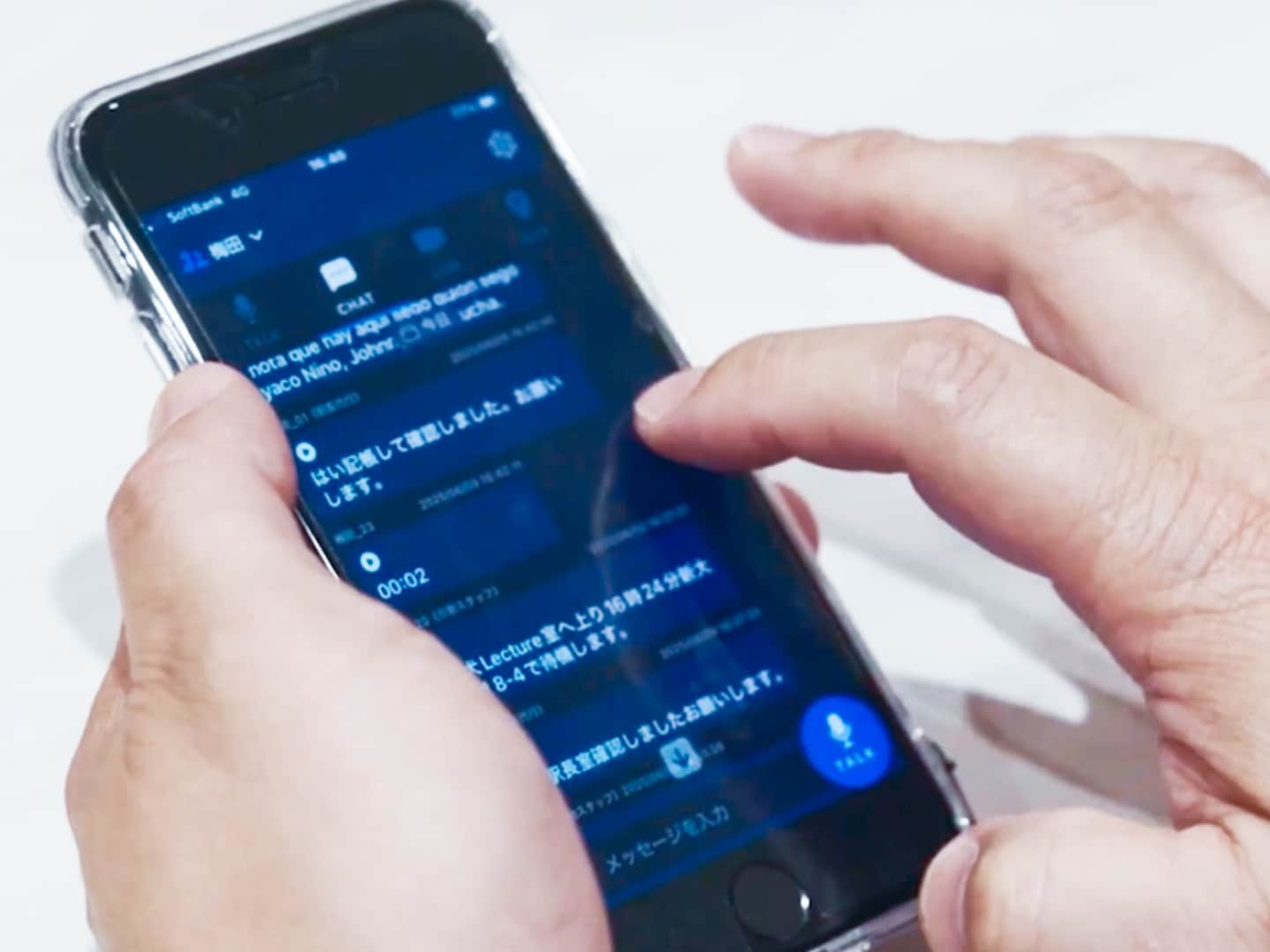
Buddycom supports broadcast and individual calls, listening to multiple groups and replaying audio history. Basic retention is 24 hours. Talk Enterprise adds transcription, translation and one-month history. Features / Plan comparison
Speech-to-text has an allowance of ten hours per person per month; translation has 180,000 characters per person per month. Use may continue above these allowances, but a fee discussion may follow. Some languages do not support reading translated output aloud; check the actual languages required.
Plans cannot be mixed within a single contract, and there are restrictions on refunds for early cancellation and downgrades during the term. If some departments only need voice and others need records, discuss communication across separate contracts as well. Contract terms
Benefits
Replay and text checks in one serviceTalk Enterprise lets staff read an earlier voice exchange. Shops and facilities that need shift handovers can keep calling and records together instead of managing separate tools.
Drawbacks
Cannot upgrade just some users within one contractIf two of ten staff need transcription, those two cannot take a higher plan within the same contract. Continuous recording also requires checking the cost above the ten-hour monthly allowance.
When to choose itFor teams needing both calls and handover records. Start with Talk Lite for short voice calls; consider Enterprise once recording users and retention needs are clear.
2. BONX WORK: hands-free conversation across departments

This is the iOS edition of the official startup guide . It shows hold-to-talk at 15:59 and switching to microphone-on at 17:00 . Published in 2023, it includes BOOST headset controls. Check separately whether existing earpieces support those same actions.
View the original Japanese BONX WORK room screen (1)
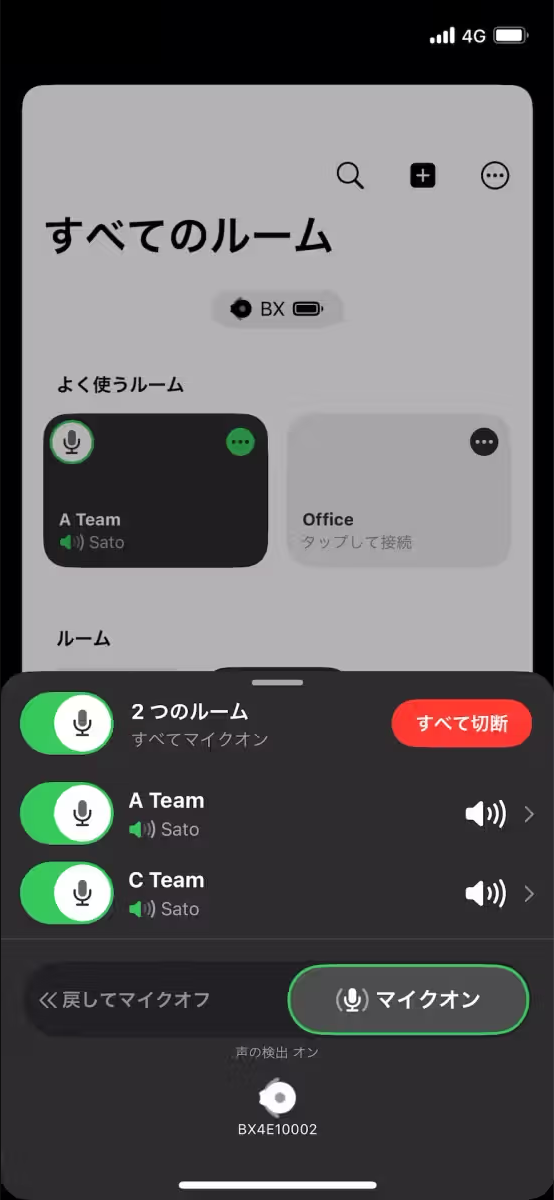
Users can switch between speech detection and PTT. Existing wired earpieces and AirPods Pro can be used, but feature restrictions mean they do not necessarily provide every control available with dedicated hardware. Features and equipment conditions
Entry allows 50 people per room and one connected room at a time. Business allows 500 per room and seven simultaneous room connections. 500 is not a simultaneous-speaker limit. If one room is sufficient, compare Entry plus eligible add-ons at JPY 400 per feature, per account, per month. Prices and functions
Transcription supports Japanese only and must be started and stopped by an administrator or manager. The official guide advises enabling it when needed rather than leaving it on for long periods. A single utterance longer than five minutes cannot be replayed, which also affects recording procedures. Transcription limits
A vendor-published Mori Trust Group hotel case study illustrates communication across departments.
Benefits
Talk across departments while hands are occupiedSpeech detection reduces transmit-button use. Business multi-room connections can link serving or transport staff with supervisors coordinating several departments.
Drawbacks
Someone must manage transcription, and it is Japanese-onlyHands-free conversation does not remove recording controls. A responsible person must start and stop transcription; it is unsuitable for unattended all-day capture or transcription in other languages.
When to choose itFor work with occupied hands and frequent cross-department calls. Start records when needed and test accidental transmission of customer conversations with the actual earpieces.
3. LINE WORKS Roger: connect field speech with office text

The official LINE WORKS film depicts shop-floor and manager communication at 1:35 and inventory checks involving head office at 2:07 . Published in 2025, it illustrates a usage scenario; it is not an app setup tutorial or a test of audio or transcription accuracy. Use it to picture how voice and text might connect.
View the original Japanese Roger transmission screen (1)
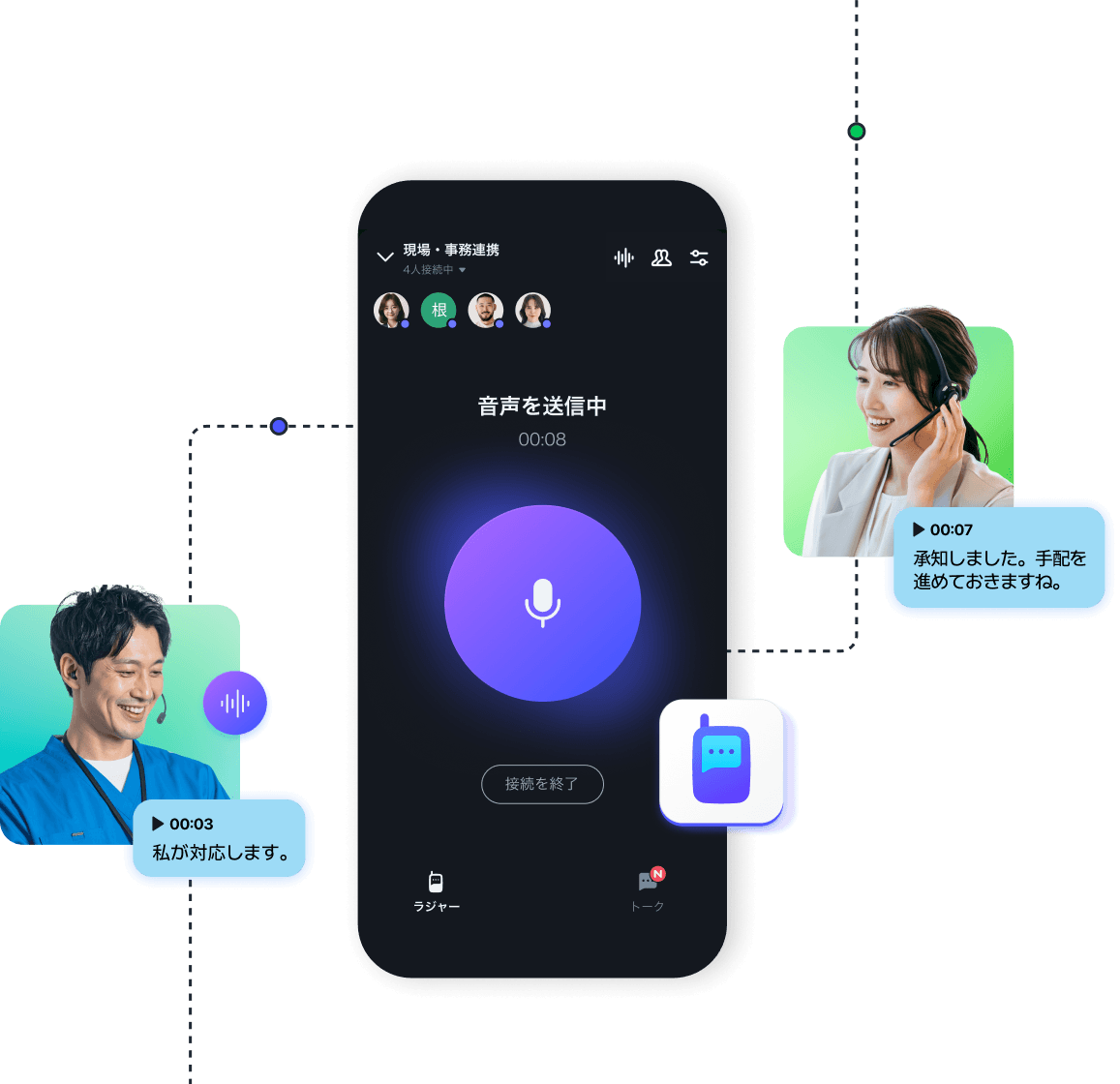
Roger connects field voice with LINE WORKS Talk in the office. Standard focuses on voice; Advanced adds transcription, text-to-speech and listening to up to ten channels. An existing LINE WORKS subscription does not by itself establish access to paid Roger functions. Product and plans
Advanced Smart Speech starts transmission with a keyword and ends it after detecting silence. Published retention is seven days in Roger alone, or three years when used with LINE WORKS. Free is limited to 30 users, one room and disconnection after 40 minutes, so it does not substitute for all-day connection.
Check both OS requirements and the tested device/earpiece list before procurement. The vendor’s Johoku Shinkin Bank case study describes lobby-to-back-office communication.
Benefits
Field staff speak; office staff can reply in textAdvanced transcription and text-to-speech, combined with LINE WORKS, let office staff read and answer field reports. This can fit an organization already using its Talk service.
Drawbacks
Long-term history requires another serviceSeven-day standalone retention cannot support a check one month later. Three-year retention requires the LINE WORKS combination, and older smartphones may need replacing.
When to choose itFor linking field staff and an office using LINE WORKS. Choose Free, Standard or Advanced according to connection duration and the need for text functions.
4. Teams Walkie Talkie: trial PTT with existing paid Teams

This official Microsoft Teams video is in English. It shows channel selection and connection at 1:02 and holding the on-screen PTT button at 1:32 . The 2022 interface differs from current channel displays. Watch how to connect and then speak. Use the current official help below for screens and requirements.
View the Japanese screen from current Teams help (1)
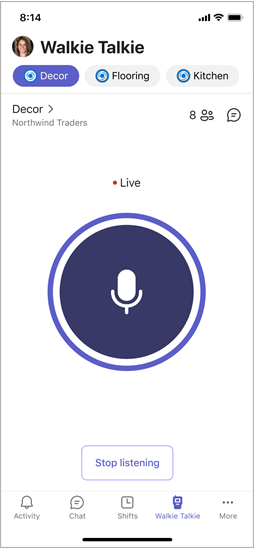
Walkie Talkie is included with all paid Teams licences. It runs in Teams on Android and iOS and needs administrator permission and deployment. Standard and private channels are supported; shared channels are not. Official specifications and licensing
Users can listen to up to five favourite channels and select the active channel for transmission. They cannot interrupt someone already transmitting. Live captions appear while the app is open; they are not retained searchable records. Changing the spoken caption language also affects other users in the same channel. Usage guide / Caption conditions
On iPhone, another PTT app running in the background can affect operation. Close other PTT apps during comparative trials, and test headset controls with the screen locked.
Benefits
Start short calls within an existing Teams contractIf everyone already has paid Teams, trial it before adding another service charge or account. Existing channels and user administration are also useful.
Drawbacks
It does not replace interruption or retained handover recordsHalf-duplex calls and live captions do not meet needs for mid-explanation questions or records for later handover. A network of shared channels cannot be transferred unchanged.
When to choose itFor organizations where everyone has paid Teams and immediate calls are enough. Complete administrator deployment and device tests before operational use.
Turn public reviews into field-test questions
App-store reviews do not control for phone, OS, app version or workplace. We use the Japanese posts we could read as trial prompts. Region of use, usage date, contract plan and relationship to the provider could not be established; average stars are not a ranking.
Roger: portability benefits and a procurement warning
A five-star Japanese App Store review dated January 19, 2026 praises using an everyday phone and talking with distant colleagues. A one-star post on November 29, 2025 reports audio problems after buying used Arrows F-02L phones in bulk. The provider acknowledged some issues and described planned fixes in a January 16, 2026 reply. That reply does not establish subsequent completion. Original reviews and reply
Test the exact model before buying a fleet. Compatibility lists mentioned in old reviews reflect their time; return to the current official list.
BONX WORK: convenient conversation, uncertain microphone state
A two-star post from October 7, 2024 values phone-based internal calling but reports unexpected hands-free state changes and dissatisfaction with reconnection sounds. Do not generalize an old-version experience to all current users. Instead, test whether staff can tell the microphone state while the phone remains in a pocket. Original BONX WORK review
Buddycom: listen to operation sounds as well as speech
A one-star post from April 14, 2025 reports discomfort from operation sounds mixed into incoming audio. The explanation is the reviewer’s account, not a cause we reproduced. It suggests testing operation tones, phone speakers and earpiece volumes at both ends. Original Buddycom review
Teams reviews mix meetings and chat with Walkie Talkie experiences, so we do not use the overall rating as a PTT score. We found insufficient Japanese posts for a comparable assessment of this feature.
Trial the service through a busy shift
Choose two services whose controls and records fit the work, then use the same phones, earpieces and routes. Fix the plan under test; do not combine free- and paid-tier results when their functions differ.
- Speak during normal movements. Include screen lock, pocketing the phone, gloves and headset buttons. Test whether speech intended for customers is accidentally transmitted.
- Change networks and locations. Check Wi-Fi/mobile transitions, lifts and back rooms, and whether staff can resume after an incoming phone call.
- Send overlapping messages. When a help request and another department’s report coincide, check who hears what and who responds.
- Have the next user open the record. Send names, shelf numbers and quantities, then check original audio and text with the incoming shift account. For BONX WORK, have an authorized person start transcription first.
- Change participants and viewers. Use trial accounts to simulate transfers and suspension. Check who can join, and whether former participants retain access to audio or history.
- Carry the setup until the shift ends. Check phone/headset batteries, notification sounds and comfort; decide charging and account handover procedures.
When a problem occurs, record location, phone/OS, earpiece, app version and both sender and receiver states. Once messages reach the right people, controls fit the work and handover records are accessible, replace the example headcount in the annual cost table with your own and choose a contract.