Compare Slack with virtual office alternatives to reduce costs while improving team productivity. Learn how combining free chat tools with virtual offices maximizes value.
Many people find Slack’s paid plans expensive and worry about the costs.
This is because Slack holds the second-largest share in Japan’s business chat tool market after Microsoft Teams, meaning many companies have adopted it.
In this article, we thoroughly compare the paid plans of the five major chat tools with high market share and explain specifically what factors make Slack costly.
Actually, even if you keep Slack on its free plan, you may be able to reduce costs by using it alongside a virtual office.
By reading this article, you’ll discover how to reduce Slack costs while improving your team’s communication quality and quantity.
5 Reasons Why Slack is Expensive: A 5-Tool Comparison
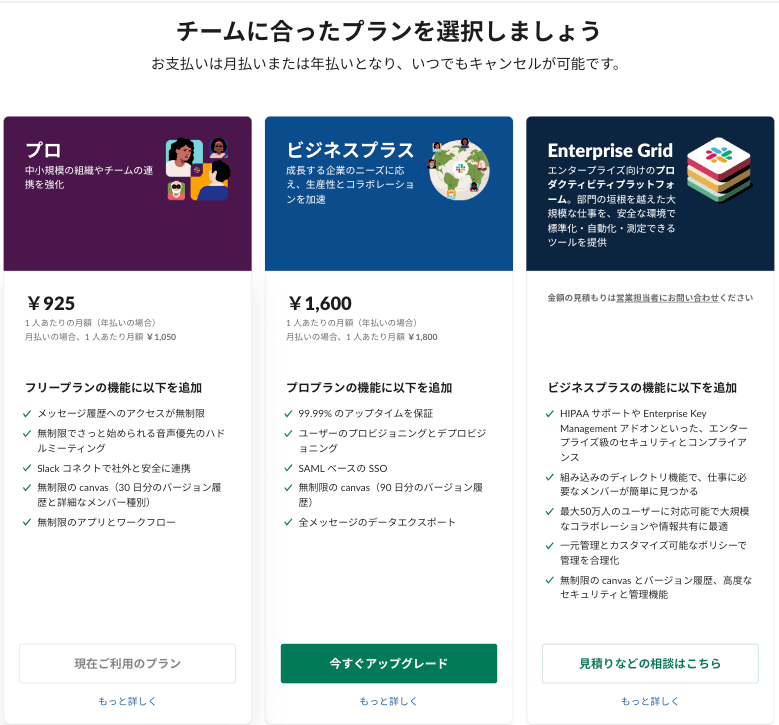
We compared the cheapest paid plans of Japan’s five major chat tools:
- Slack
- Microsoft Teams
- LINE WORKS
- Google Chat
- Chatwork
| Tool | Monthly/Person (Annual) | Trial | Storage | Video Call | SLA |
|---|---|---|---|---|---|
| Slack | ¥925 | On request | 10GB | 15 people | ✕ |
| Microsoft Teams | ¥599 | ✕ | 10GB | 300 people | ✕ |
| LINE WORKS | ¥450 | Partner only | 1TB (shared) | 200 people | ○ |
| Google Chat | ¥680 | 14 days (up to 10) | 30GB | 100 people | ○ |
| Chatwork | ¥700 | 1 month | 10GB | 14 people | ✕ |
Comparing with other chat tools reveals these 5 reasons why Slack’s paid plan is expensive:
- Highest monthly fee among chat tools
- Limited storage
- Limited video call participants
- No service level agreement
- High learning curve
Let’s examine each reason in detail.
1. Highest Monthly Fee Among Chat Tools
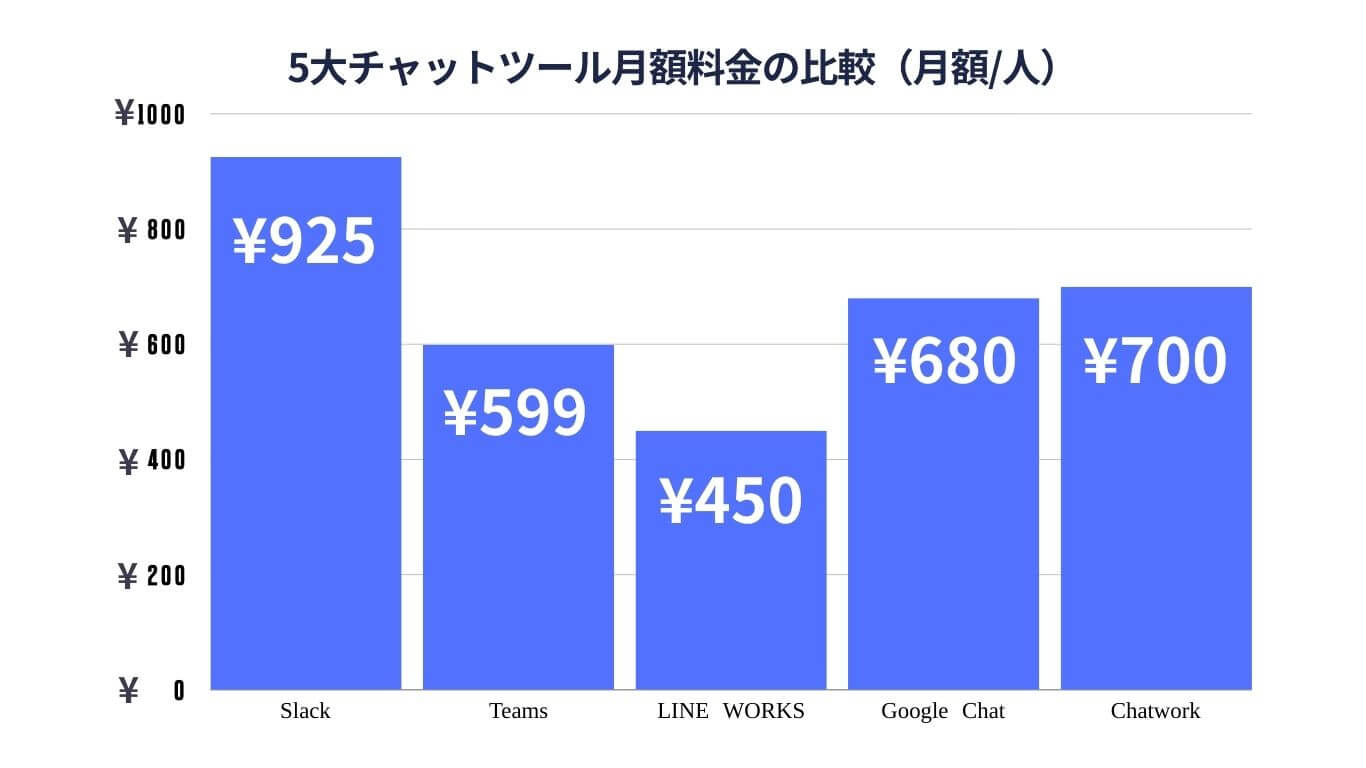
Annual contract monthly rates
Comparing the monthly rate per person among the five major chat tools, Slack’s rate (¥925) is the highest.
The average cost of the cheapest paid plans across the five tools is ¥670, showing that Slack and Google Chat are expensive.
What’s surprising is that Slack’s price is almost double that of Teams (¥450)—a significantly high price point.
For reference:
- Teams’ next tier is still only ¥899
- LINE WORKS’ next tier is ¥800
- Chatwork’s next tier is ¥1,200
Of course, if the performance matches the price, there’s no problem. Let’s look at features beyond pricing.
2. Limited Storage
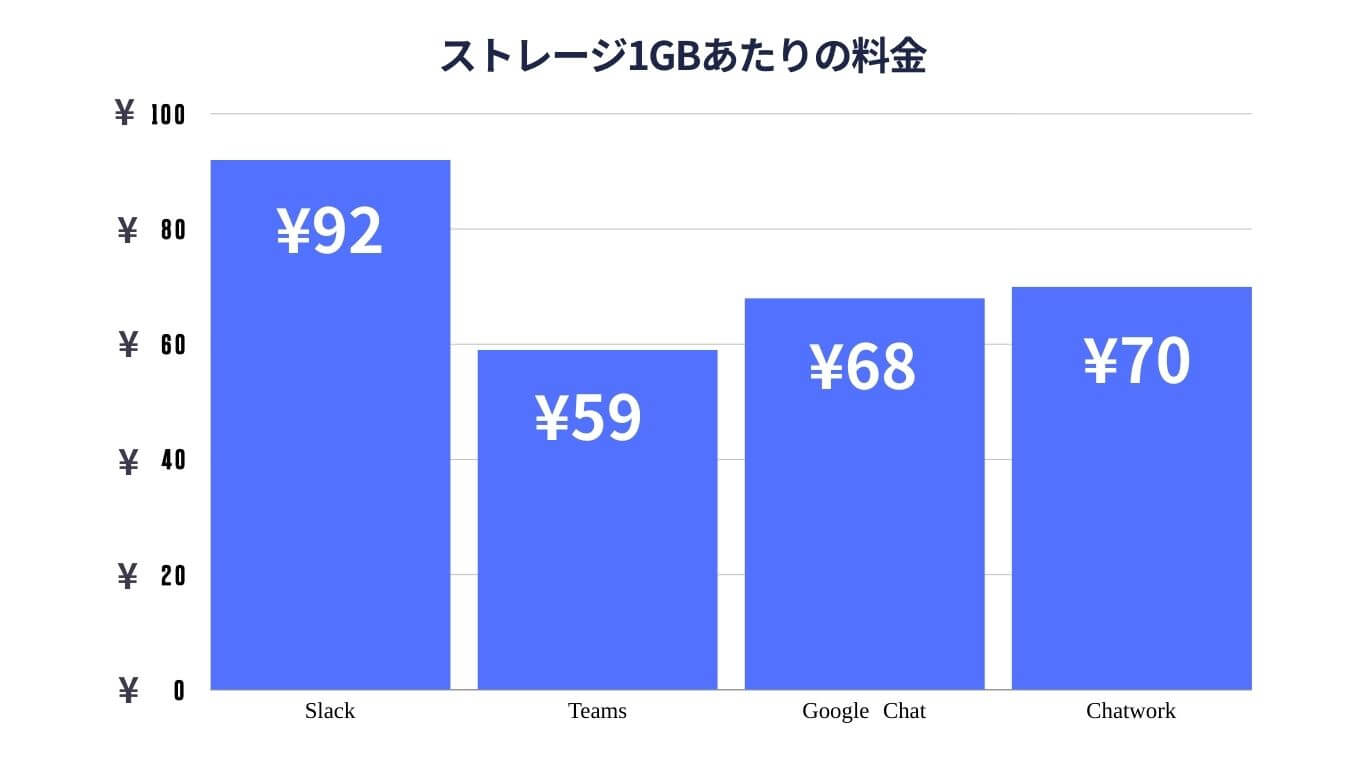
LINE WORKS excluded as it uses shared storage (1TB) rather than per-user
Slack’s storage, along with Teams and Chatwork, is 10GB—the lowest amount.
Google Chat offers 30GB, which is three times more than the other three chat tools.
While the same storage for the same monthly fee wouldn’t be a problem, as mentioned earlier, Slack’s paid plan has the highest price.
| Tool | Cost per 1GB (Cheapest Plan) | Cost per 1GB (Next Tier) |
|---|---|---|
| Slack | ¥92 | ¥160 |
| Teams | ¥59 | ¥89 |
| Google Chat | ¥68 | ¥136 |
| Chatwork | ¥70 | ¥120 |
When converted to cost per GB of storage, Slack’s poor cost-performance becomes clear.
3. Limited Video Call Participants
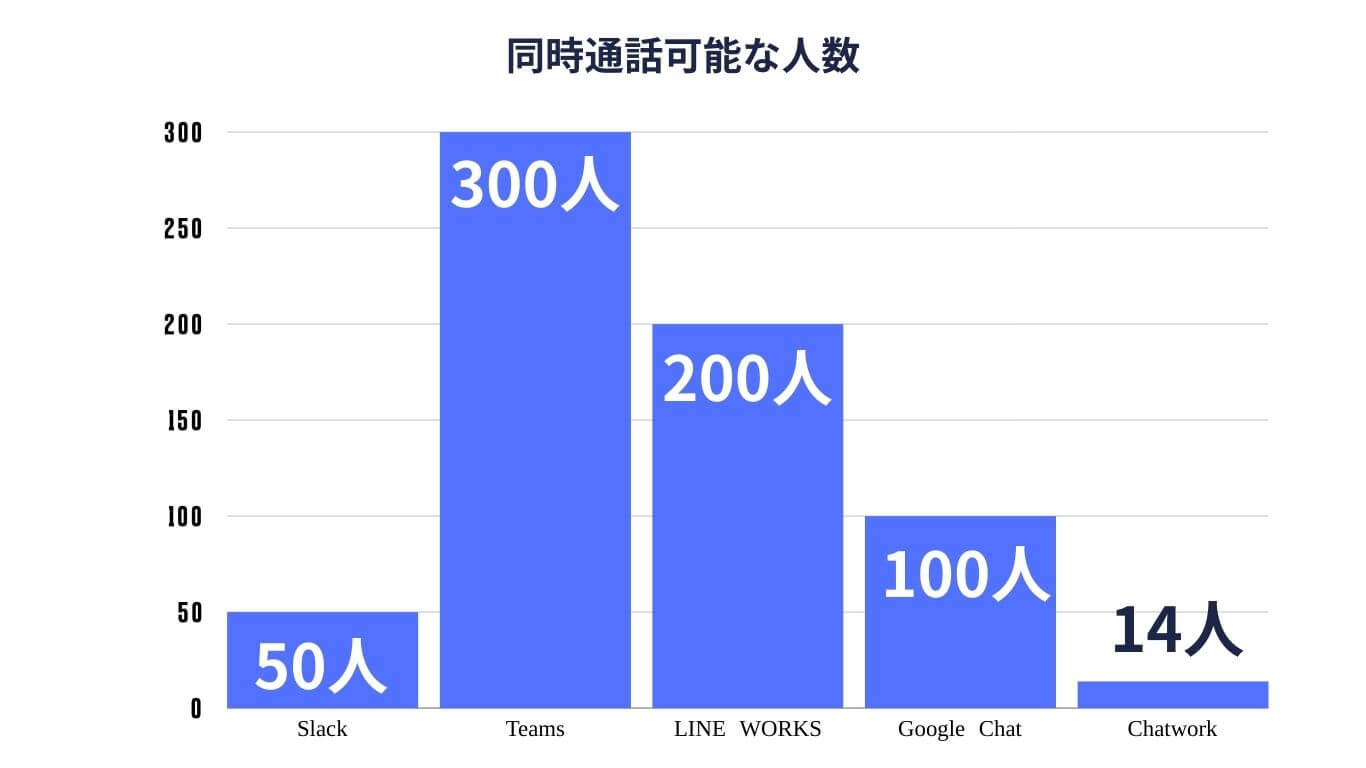
One weakness of chat tools like Slack and Chatwork is the limited number of simultaneous video call participants.
Of course, since they’re “chat” tools, they shouldn’t be compared directly with Teams.
However, what’s important to consider with Slack is that despite its “high monthly fee,” video call capacity is also limited.
Compared with Chatwork, which is also classified as a chat tool: Chatwork offers 14 people for ¥500, while Slack offers 50 people for ¥925.
4. No Service Level Agreement
| Tool | Monthly/Person (Annual) | SLA |
|---|---|---|
| Slack | ¥925 | ✕ |
| Microsoft Teams | ¥599 | ✕ |
| LINE WORKS | ¥450 | ○ |
| Google Chat | ¥680 | ○ |
| Chatwork | ¥700 | ✕ |
The cheapest paid plans for Slack, Teams, and Chatwork don’t include a Service Level Agreement (SLA).
Simply put, an SLA guarantees that “the app will work properly 99.9% or more of the time without bugs or issues.”
For example, if there are many unannounced maintenance periods, the SLA is not being fulfilled.
This means that Slack, Teams, and Chatwork’s cheapest paid plans have no guarantee of when the service might become unavailable.
Of course, lacking an SLA doesn’t mean the service is completely unusable—it just means there’s no guarantee during emergencies.
Note that all three tools do offer SLA guarantees with their next tier up.
5. High Learning Curve
Slack differs from everyday chat apps like LINE, so first-time users need time to get accustomed.
To use Slack effectively, you must understand:
- Workspaces
- Channels within workspaces
- Threads within channels
Unlike LINE or Chatwork, it’s initially difficult to see who sent messages and how many unread messages you have.
Of course, continued use leads to familiarity, and once familiar, you can fully enjoy the benefits.
The key point is that the “initial learning cost is high.”
If Slack is Too Expensive: Switch to Free Plan + Virtual Office
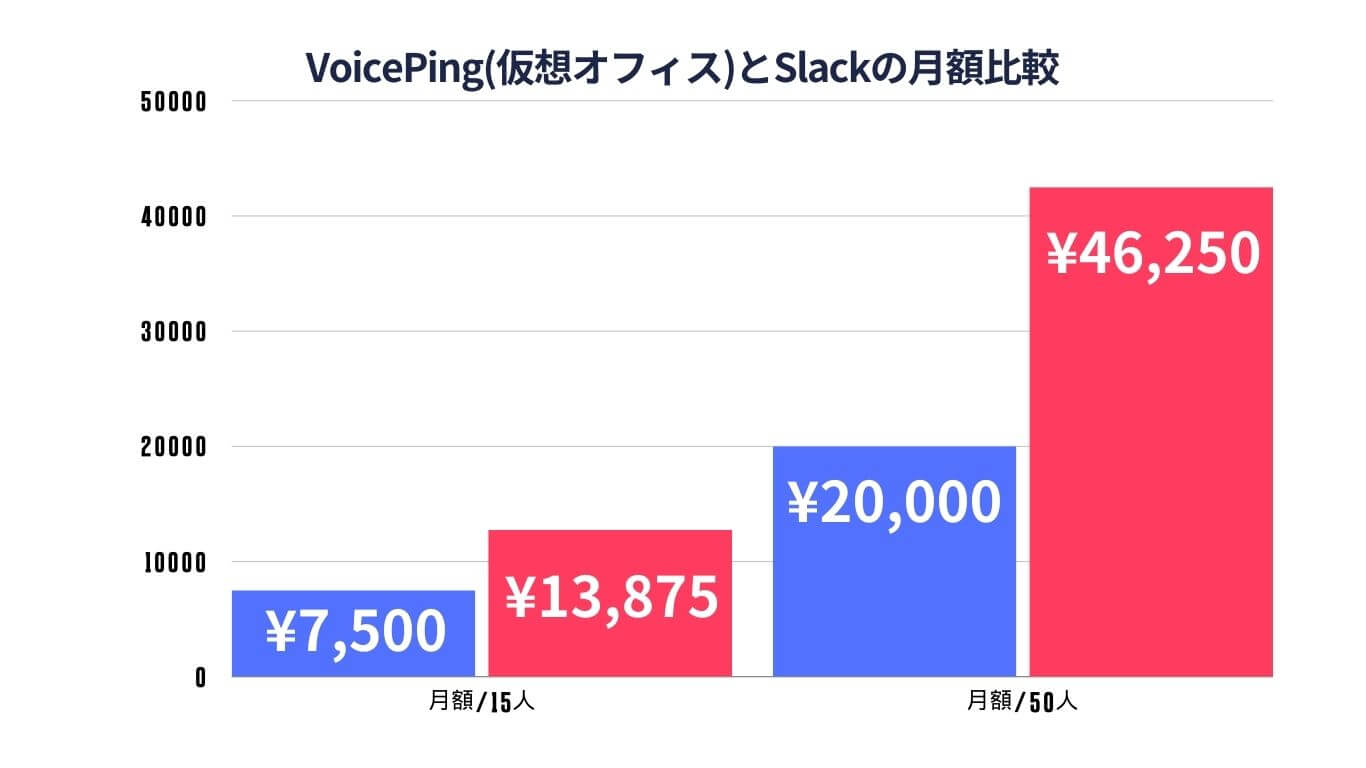
If you find Slack expensive, we recommend switching to the free plan and adopting a “Slack free plan + virtual office” setup.
Why? Because it costs less than Slack’s paid plan.
- For 15 people: VoicePing virtual office costs ¥90,000/year vs Slack at ¥166,500/year — a difference of ¥76,500
- For 50 people: VoicePing costs ¥240,000/year vs Slack at ¥555,000/year — a difference of ¥315,000
While virtual offices are clearly cheaper, “combining” a chat tool like Slack with a virtual office maximizes cost-performance.
In other words, rather than continuing with Slack’s paid plan, building a “cheap virtual office + free Slack setup” increases productivity while reducing costs.
4 Benefits of Virtual Offices That Slack Can’t Provide
Virtual offices offer four benefits that Slack can’t provide:
- Eliminate anxiety about when replies will come
- Eliminate frustration when nuances don’t come across
- Feel like “working together” even while remote
- See team members’ work status
1. Eliminate Anxiety About When Replies Will Come
With a virtual office, you can see others’ status and speak directly to confirm things without waiting for replies.
The advantage of chat tools like Slack is the ease of sending messages, but when the recipient views the message is up to them. Therefore, anxiety about not receiving replies after sending messages is inevitable.
In contrast, most virtual offices let individuals set their status:
- Green if available to talk
- Red if busy with something else
When you send a message but don’t get a reply, you can check their status to know “they must be busy and haven’t seen it,” or if you need confirmation quickly, you can speak directly to resolve it.
Also, even if you accidentally mark a message as read and cause confusion, you can casually ask “Did you see my message?” without slowing down work.
2. Eliminate Frustration When Nuances Don’t Come Across
For times when “text alone won’t convey this, but it’s not worth scheduling a web meeting,” virtual offices solve this instantly.
This is because the person you want to speak to is working together in the online office, allowing you to speak just like in a physical office.
If they’re available, you can speak up and quickly resolve matters that text couldn’t convey. You can also share your screen while talking, allowing easy communication without needing to start a web meeting.
3. Feel Like “Working Together” Even While Remote
Virtual offices have everyone working together in an online office. Each employee’s icon appears in the online office, creating the sensation of being in an actual office.
When you arrive in the morning, sending “Good morning” messages to everyone in your department via Slack is often intrusive. In contrast, with a virtual office, you can casually say “good morning,” preventing the decline in communication.
Virtual offices also allow free customization of spaces beyond just work floors, including:
- Meeting rooms
- Reception areas
- Break spaces
4. See Team Members’ Work Status
Virtual offices show not just basic status but also what tasks people are currently working on.
Knowing what work others are doing makes it natural to ask questions about related matters or offer help. For example, you can speak to someone creating a sales presentation and specifically point out parts you’d like them to revise.
Some tools also let you check what apps members are using on their PCs and have time-tracking features to review the entire team’s work logs, making team productivity visible in ways Slack can’t provide.
4 Virtual Offices That Work with Slack
1. VoicePing
| Plan | Free | Small | Premium | Enterprise |
|---|---|---|---|---|
| Per Space/Month | ¥0 | ¥8,250 | ¥33,000 | ¥990/person |
| Users | 5 | 15 | 50 | Unlimited |
| Initial Cost | ¥0 | |||
| Trial | Forever free | 14 days | ||
| Screen Sharing | ○ | |||
| Chat | ○ (Slack/Chatwork integration) |
VoicePing can integrate with Slack and Chatwork, automatically notifying members of what everyone is currently doing.
This is possible because VoicePing has time-tracking functionality. Time-tracking lets you know which projects are using whose time.
For example, if you start a “Create Proposal” project in VoicePing, the integrated Slack/Chatwork automatically gets notified that you started “Create Proposal.”
Using VoicePing enables productivity improvements that chat tools alone can’t achieve.
Getting Started:
- Try the free plan with volunteers
- Use the 14-day paid plan trial
- Implementation also costs ¥0
Zero cost until implementation. If you’re interested, try the free plan.
2. Tandem
| Plan | Free | Small Teams | Medium Teams |
|---|---|---|---|
| Monthly/User | $0 | $8 (annual) | Contact |
| Users | 50 | Unlimited | Unlimited |
| Initial Cost | $0 | ||
| Trial | Forever free | 30 days | Contact |
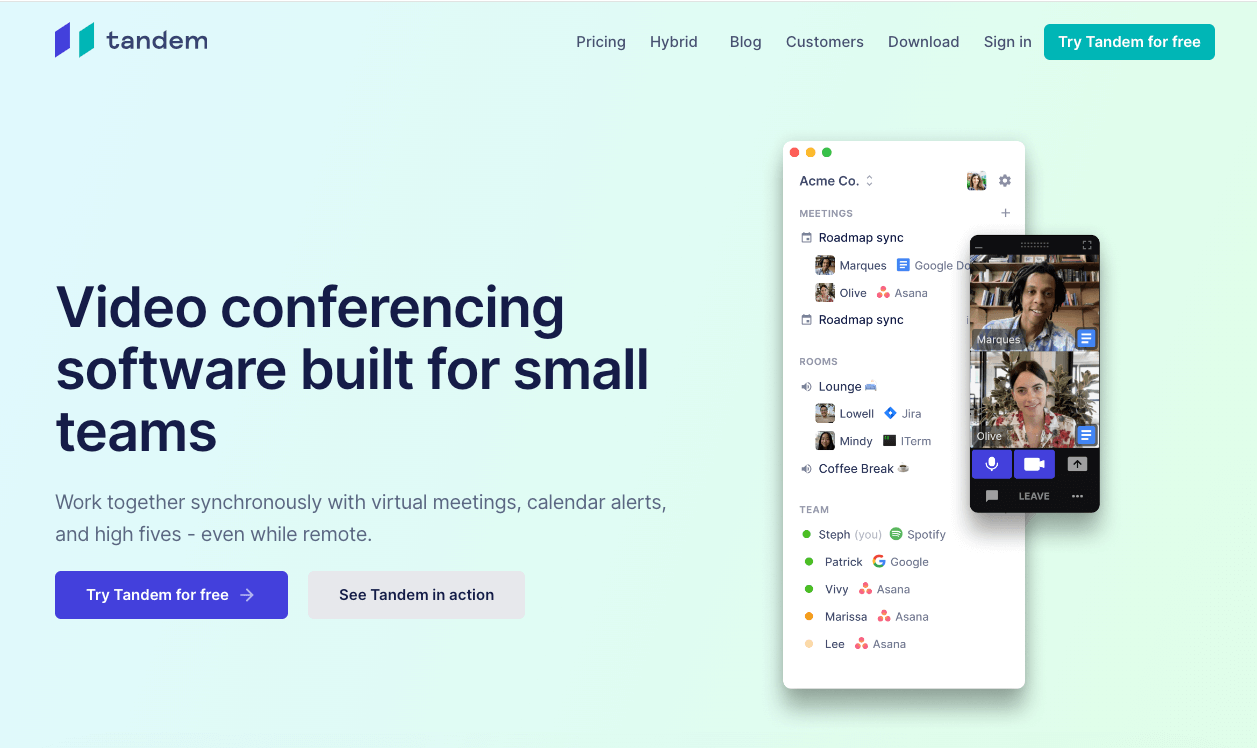
Tandem is an American virtual office tool used by major companies like Dropbox and Spotify.
Like VoicePing, it has a forever-free plan for unlimited trials, but note it’s English-only.
The UI is very simple—rather than having a 2D office, employees simply appear in a straightforward list. You can instantly see who’s logged in, what they’re doing, and who’s in which meeting room.
It’s recommended for companies that only need minimal features. With integration for over 100 apps, you can see at a glance which apps everyone is using.
3. oVice
| Plan | Free | Business | Education |
|---|---|---|---|
| Per Space/Month | ¥0 | ¥82,500 | ¥200~/person |
| Users | TBD | 50+ | 200 (recommended 40) |
| Initial Cost | ¥0 | ||
| Trial | 14 days | ||
| Chat | ○ (Slack integration) |
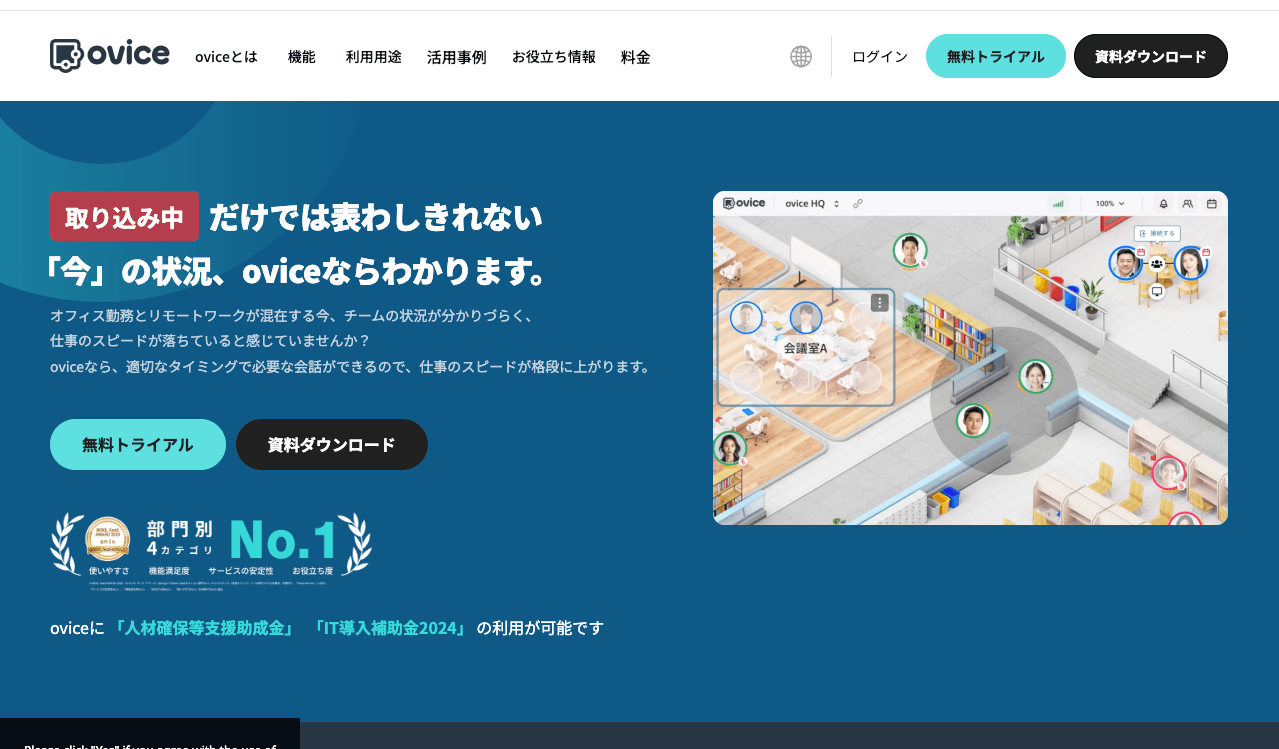
oVice is recommended for companies wanting a fun, engaging virtual office.
With over 200 background variations, you can customize your office to your liking. Its appeal is usability for large enterprises, enabling creation of building-like offices online.
oVice is suitable for daily work as a virtual office but is also great for events:
- Trade shows
- Parties and gatherings
- Company-wide social events
- Job fairs
Creating an enjoyable environment is oVice’s strength.
4. mycrew
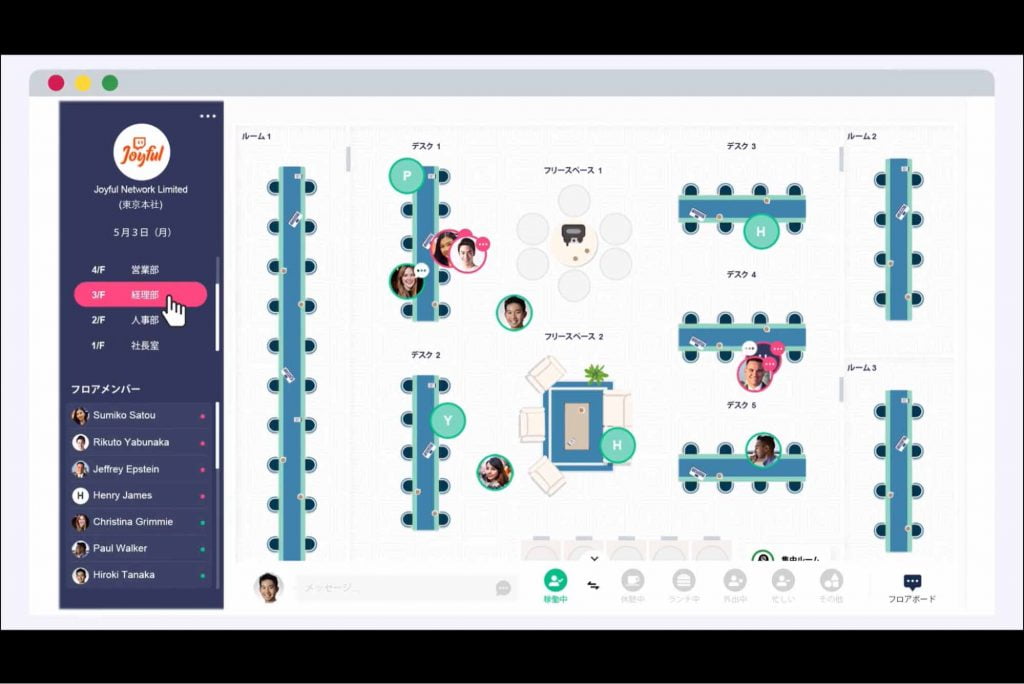
mycrew was released in March 2021 and features a “simple UI” as its virtual office tool characteristic.
With no user limit, contracts are per user rather than per space. Pricing is the same as Chatwork’s Business plan at ¥550/month (tax included).
With a 2-week trial period, you can thoroughly evaluate before implementation. Implementation also costs ¥0.
mycrew’s features include floor-wide announcements—not just to nearby people, but to the entire floor for “good morning” or “goodbye” greetings, enabling communication like in a real office even while remote working.
Conclusion: Combining Chat Tools and Virtual Offices Is Key
Virtual offices are tools with many benefits that Slack can’t provide.
For the same number of people, virtual offices can reduce costs, and they help solve communication issues unique to remote work.
Continuing with Slack’s paid plan is one option, but combining Slack or Teams’ free plans with a virtual office can reduce costs while also improving productivity.
Some virtual office tools offer free trials or forever-free plans, so please consider trying them.
Try VoicePing free and see how combining it with your existing chat tools can boost productivity.