In this article
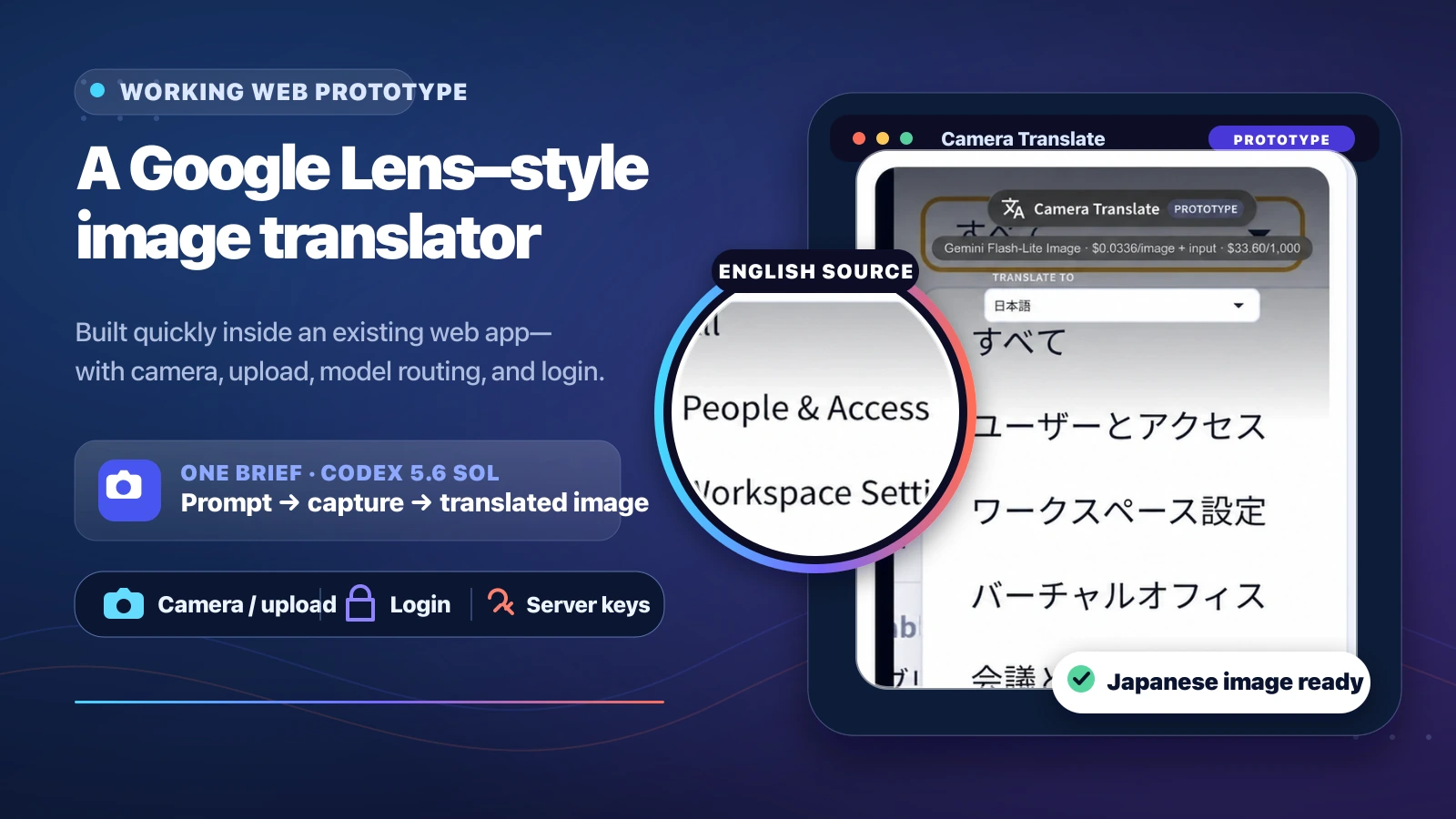
See how Codex 5.6 Sol at xhigh effort turned one brief into a secure, testable Google Lens-style translation prototype.
An English interface became a Japanese image
We built a working, authenticated web prototype that accepts a camera capture or uploaded image, lets the user choose a target language, and returns either translated text overlays or a newly rendered translated image. The English-to-Japanese test below shows the complete interaction and its translated output.
The demonstration is intentionally silent; enable captions in the player. The original recording is also available on Loom .
This was not a disconnected AI demo. We added the route to the existing VoicePing web application, reused its login and interface system, supported desktop webcams and mobile rear cameras, and added image upload for repeatable testing. The result made the product idea concrete enough to evaluate.
The prototype is inspired by the interaction pattern popularized by Google Lens. It is an independent VoicePing experiment and is not affiliated with or endorsed by Google.
Why build the application before debating the architecture?
Image models can read and rewrite text, but an API response does not answer the product questions around it. A usable prototype does.
Once the workflow ran inside a real application, we could evaluate questions that were previously abstract:
- Does the user understand when the camera starts and when an image leaves the device?
- Is a browser overlay or a completely rewritten image easier to read?
- How visible should provider, model, latency, and price choices be?
- Do menus, signs, labels, and application screenshots behave differently?
- What must change before the prototype can safely serve production traffic?
This is the main reason to build this kind of application quickly. The goal is not to declare the first implementation finished. The goal is to replace assumptions with something people can use, inspect, and challenge.
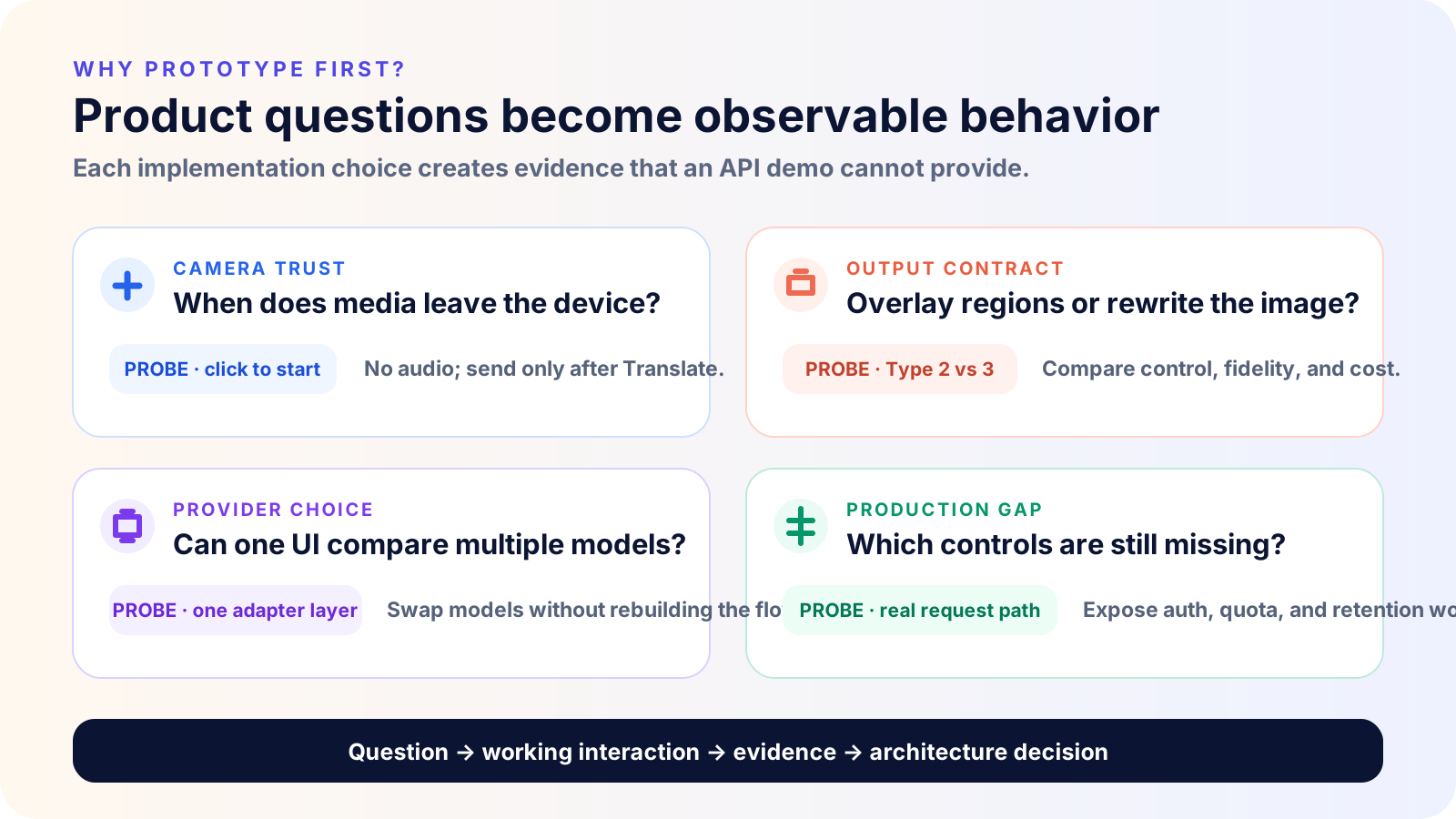
The prototype creates a short decision loop: implement one interaction, observe how it behaves, and use that evidence to shape the next architectural choice. For example, freezing a frame is not merely a camera detail. It makes the submitted data visible to the user, creates a stable input for comparing providers, and separates capture consent from processing consent.
The provider layer is also moving quickly. Our earlier commercial OCR API benchmark found meaningful trade-offs between speed, reliability, and successful-output accuracy. A prototype exposes those trade-offs in the actual interaction instead of hiding them behind a model leaderboard.
How we built it quickly with Codex
We used Codex 5.6 Sol with xhigh reasoning effort. OpenAI’s Codex model guide
identifies GPT-5.6 Sol as the hosted Codex model, while the model configuration supports xhigh reasoning for complex tasks. The higher setting was useful here because the work crossed UI, browser media APIs, provider adapters, secrets, request validation, testing, and repository conventions.
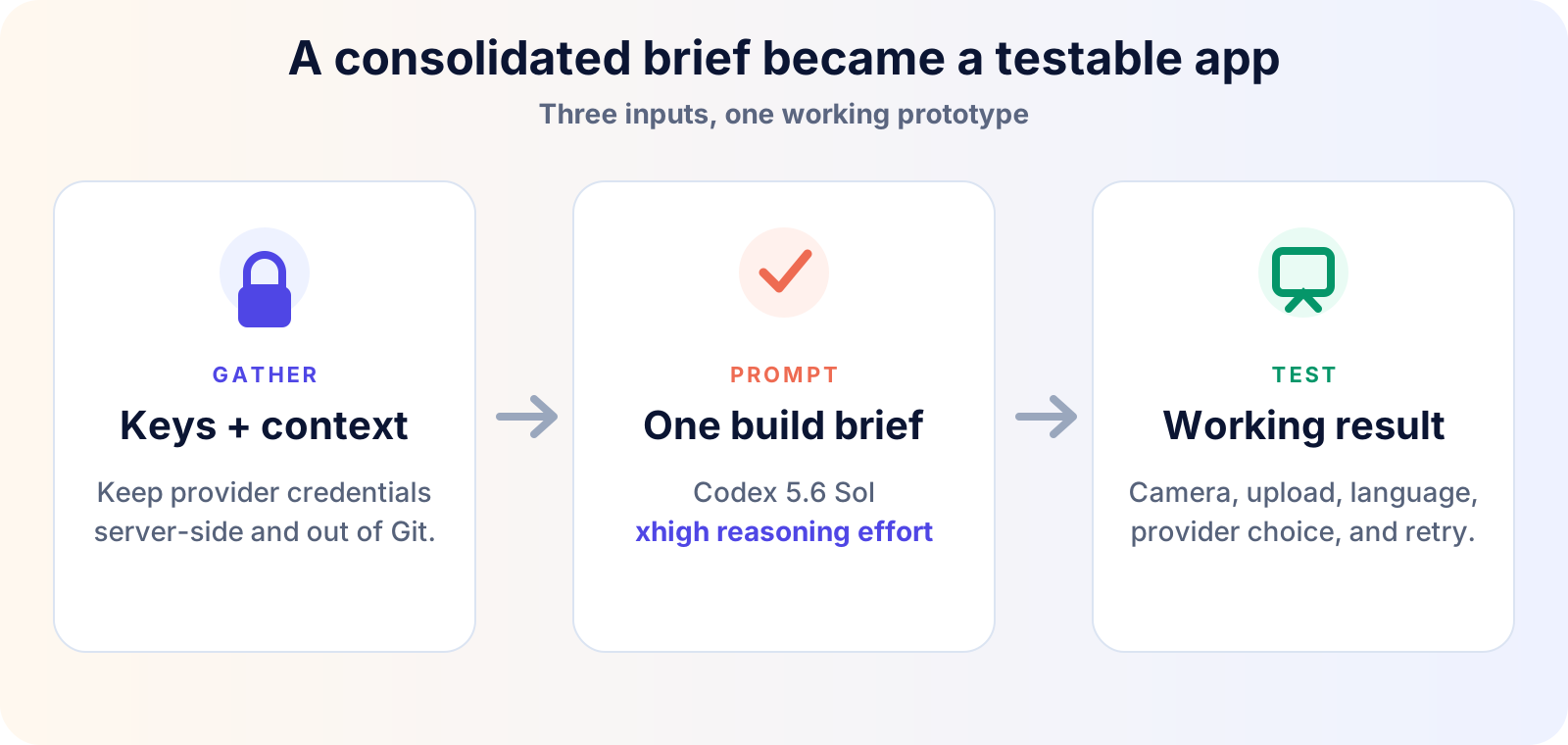
Gather the keys and repository context
We collected the required provider credentials and kept them in local, server-side configuration. We did not paste them into client code, screenshots, the article, or Git.
The other critical input was repository context: the existing login flow, routing, UI primitives, environment conventions, and project instructions. This matters as much as the API keys. OpenAI’s Codex prompting guidance recommends supplying the goal, relevant context, expected output, and boundaries; repository guidance makes those boundaries repeatable.
Give Codex one consolidated build brief
The prototype evolved through feedback, but the following single brief captures the complete request in a reproducible form:
| |
The prompt is short because the repository supplies the rest of the specification. Codex can inspect established patterns, ask the codebase how authentication and navigation work, and validate the implementation against the same project rules used by the team.
Run the application and test the result
We tested the full interaction rather than stopping at a successful build: open the authenticated route, select the full-image workflow, upload an English interface screenshot, choose Japanese, submit it, and inspect the returned image.
That test immediately revealed product details worth keeping: the input should be frozen before processing; the user needs a clear New action; loading needs to name the selected model; and source and target images should remain visually comparable.
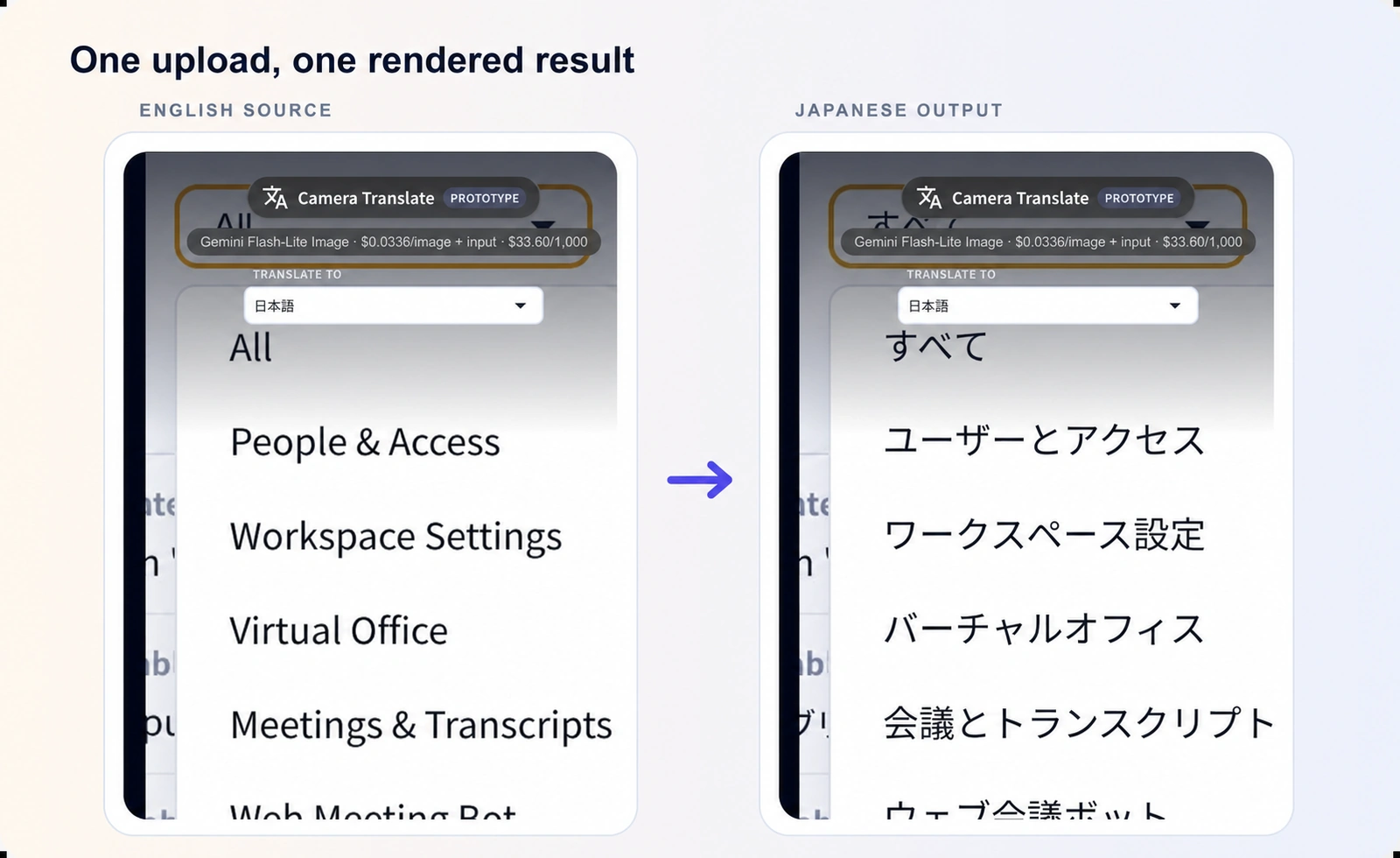
The test output directly after the build brief: the uploaded English interface and the provider-rendered Japanese image.
How the application works
The implementation has one input pipeline, one protected server boundary, and two output contracts. That separation is more important than any individual model choice.
The browser handles media capture, preview, compression, configuration, and final presentation. A same-origin endpoint validates the request and dispatches it through a provider adapter. The adapter hides provider-specific payloads from the React UI and returns either structured regions or a complete translated image. The browser never receives an API key.
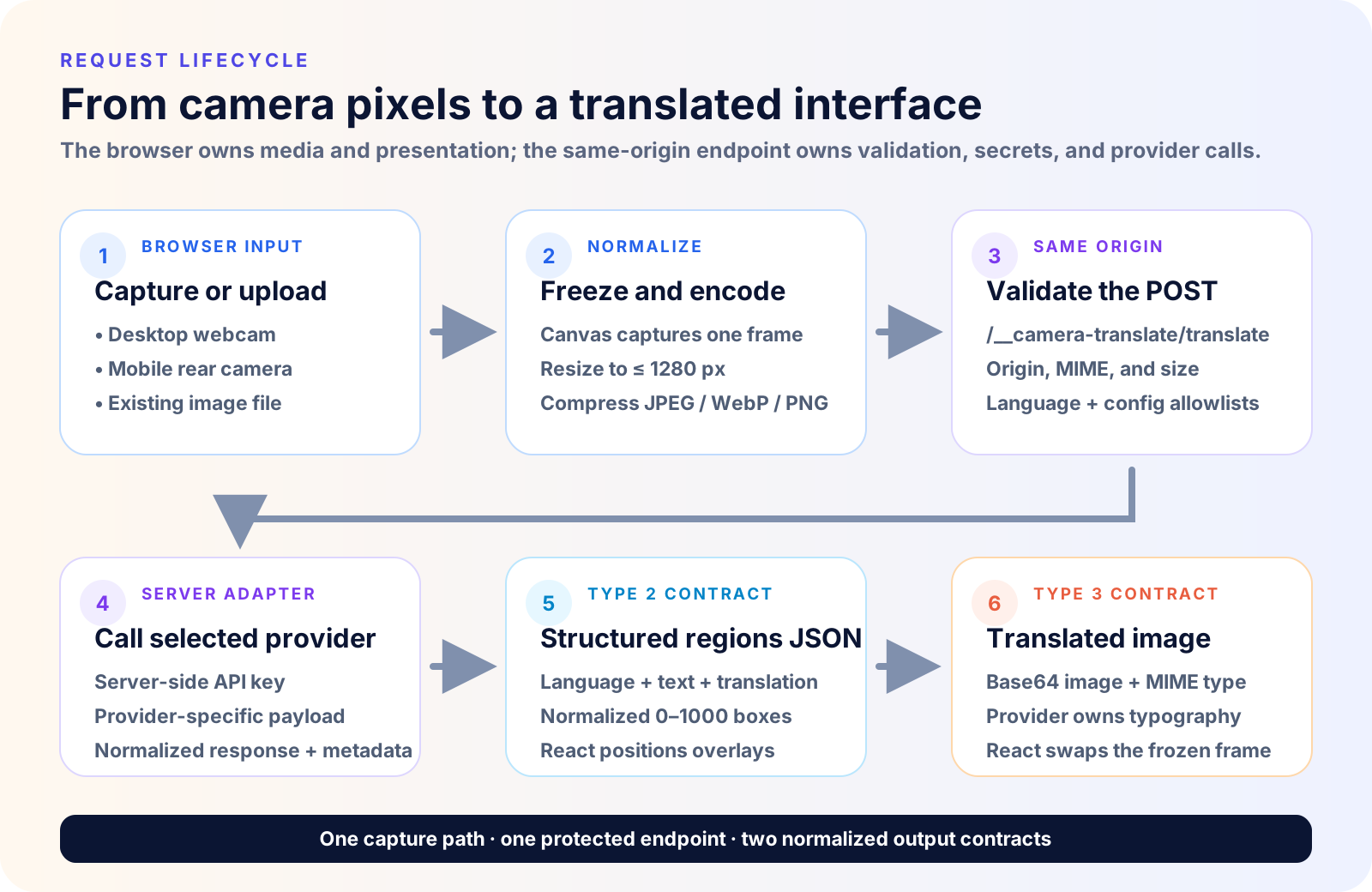
The request lifecycle, layer by layer
Execution map
What crosses each boundary
| Runtime | Receives | Owns | Emits |
|---|---|---|---|
| Browser | Camera stream or file | Permission, preview, freeze, resize, compression | image + target + config |
| Endpoint | Same-origin POST | Origin, method, size, MIME, language, allowlists | validated request |
| Adapter | Normalized configuration | Server secret, provider payload, response parsing | regions or image |
| React | Stable application contract | Overlay projection or translated-image display | visible result |
Browser capture and normalization
The page requests camera access only after the user clicks Start camera. It requests the rear-facing camera on mobile when the browser can provide one, and it does not request audio. Uploads provide a deterministic alternative for testing.
For a camera capture, a canvas freezes the current video frame as JPEG at quality 0.82. Both camera frames and uploaded images are resized to a maximum dimension of 1280 pixels. Large uploads are recompressed through progressively lower quality settings until their base64 representation fits beneath the request budget. The upload picker accepts files up to 20 MB, but the server-facing payload is intentionally much smaller.
This step creates a provider-independent input. It also prevents a continuously moving camera from changing underneath a slow model call.
Same-origin request validation
The client sends a single POST to /__camera-translate/translate. Before any paid provider call occurs, the middleware checks the method and same-origin relationship, caps the JSON body and encoded image lengths, permits only JPEG, PNG, and WebP, validates the target language, and reconciles the selected architecture, candidate, and model against a server allowlist.
The important design choice is that the browser does not send an arbitrary provider URL or model name. It requests a known configuration; the server decides whether that configuration is valid and how it maps to credentials and upstream endpoints.
Provider adapter and response normalization
The provider layer translates the stable application request into a Gemini, OpenAI, Mistral, Qwen, or OCR-specific payload. It also converts each upstream response back into one of two small contracts. Provider names, model identifiers, token usage, and wall time can travel as metadata, while UI rendering stays independent of each vendor SDK.
Two output architectures
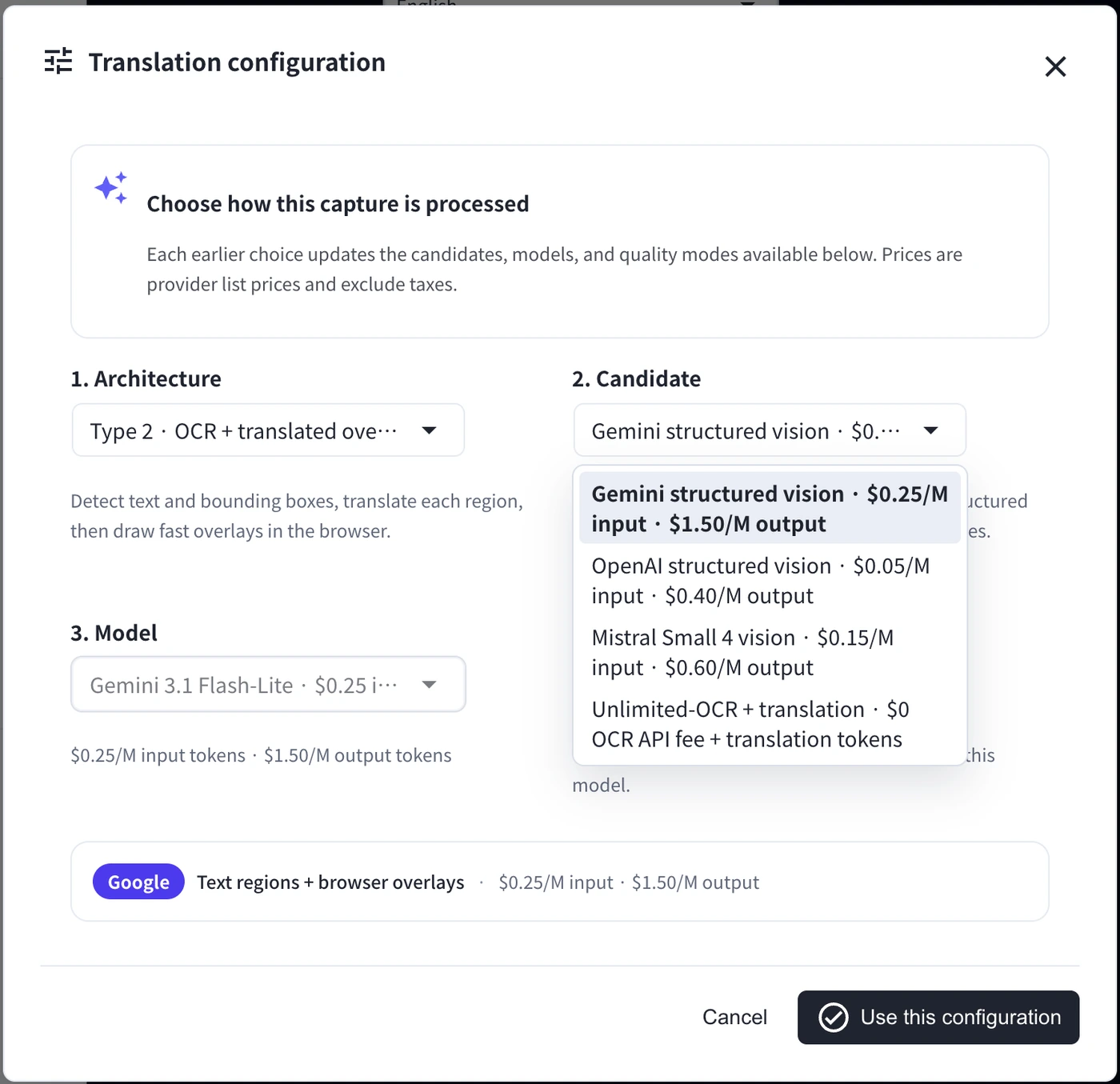
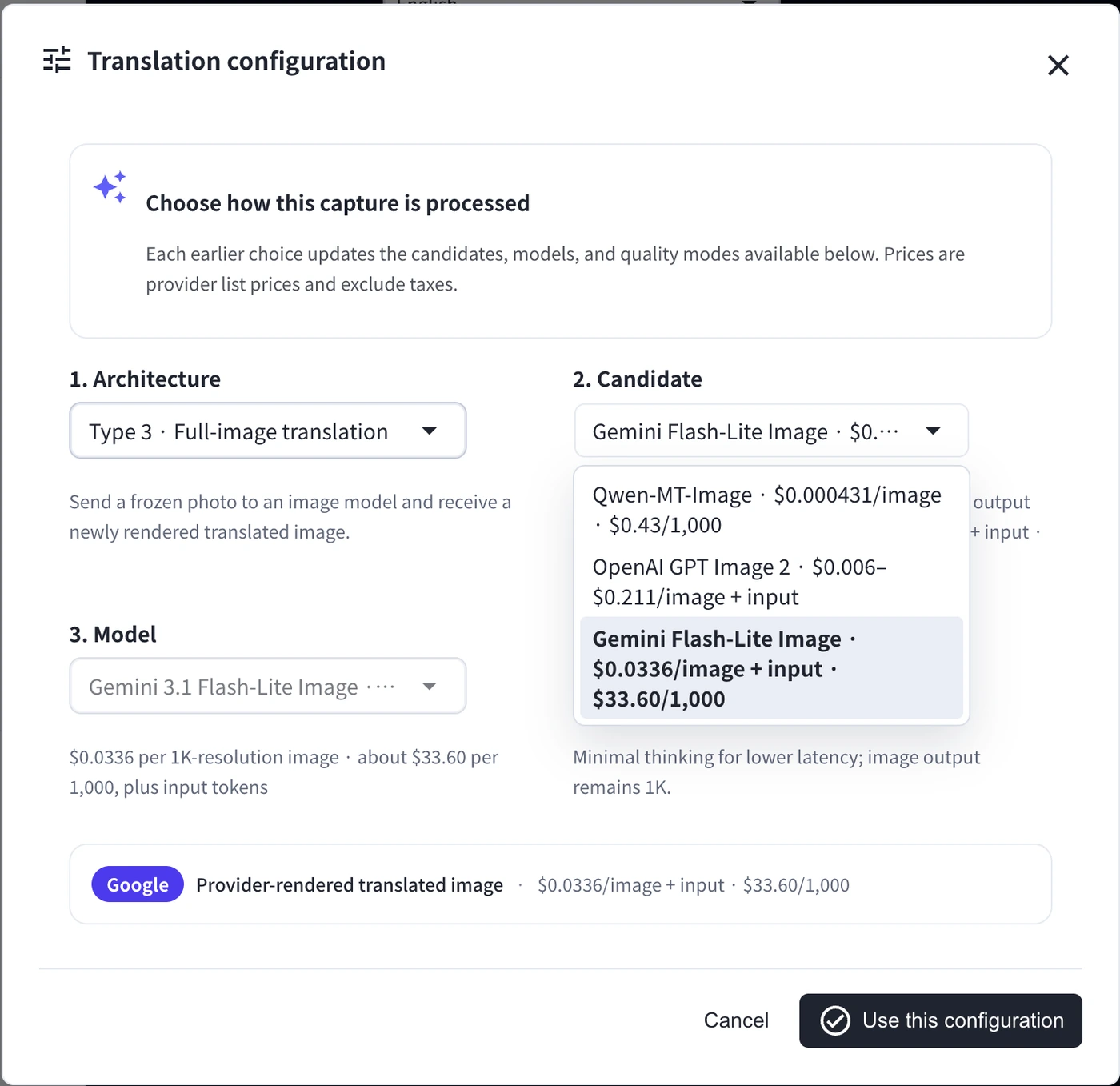
The configuration dialog exposes two fundamentally different ways to produce the experience:
OCR with browser overlays
Provider-rendered image
OCR with browser overlays returns detected regions, bounding boxes, and translated strings. Each bounding box uses [ymin, xmin, ymax, xmax] coordinates normalized to 0–1000, so it is independent of the source resolution. React validates and clamps up to 100 regions, projects the coordinates into the displayed image, and positions translated labels over the frozen frame. This approach keeps layout control in the application, but the renderer must handle rotation, crowded labels, text size, contrast, perspective, and contain versus cover scaling.
Provider-rendered image translation sends the frozen image to a multimodal image model and receives a new image with translated text. It can preserve the visual feel of menus, signs, and interfaces better, but it is slower, more expensive, and less deterministic. The result is a generated image, not a pixel-perfect mutation of the source.
The same UI can test both because the server normalizes provider-specific responses into a small application contract. Provider and model selection are configuration, not separate pages.
| |
The security boundary
Security is not one checkbox at the provider call. It is the set of decisions around what enters the endpoint, where credentials exist, what leaves the process, and what must be added before traffic is untrusted.
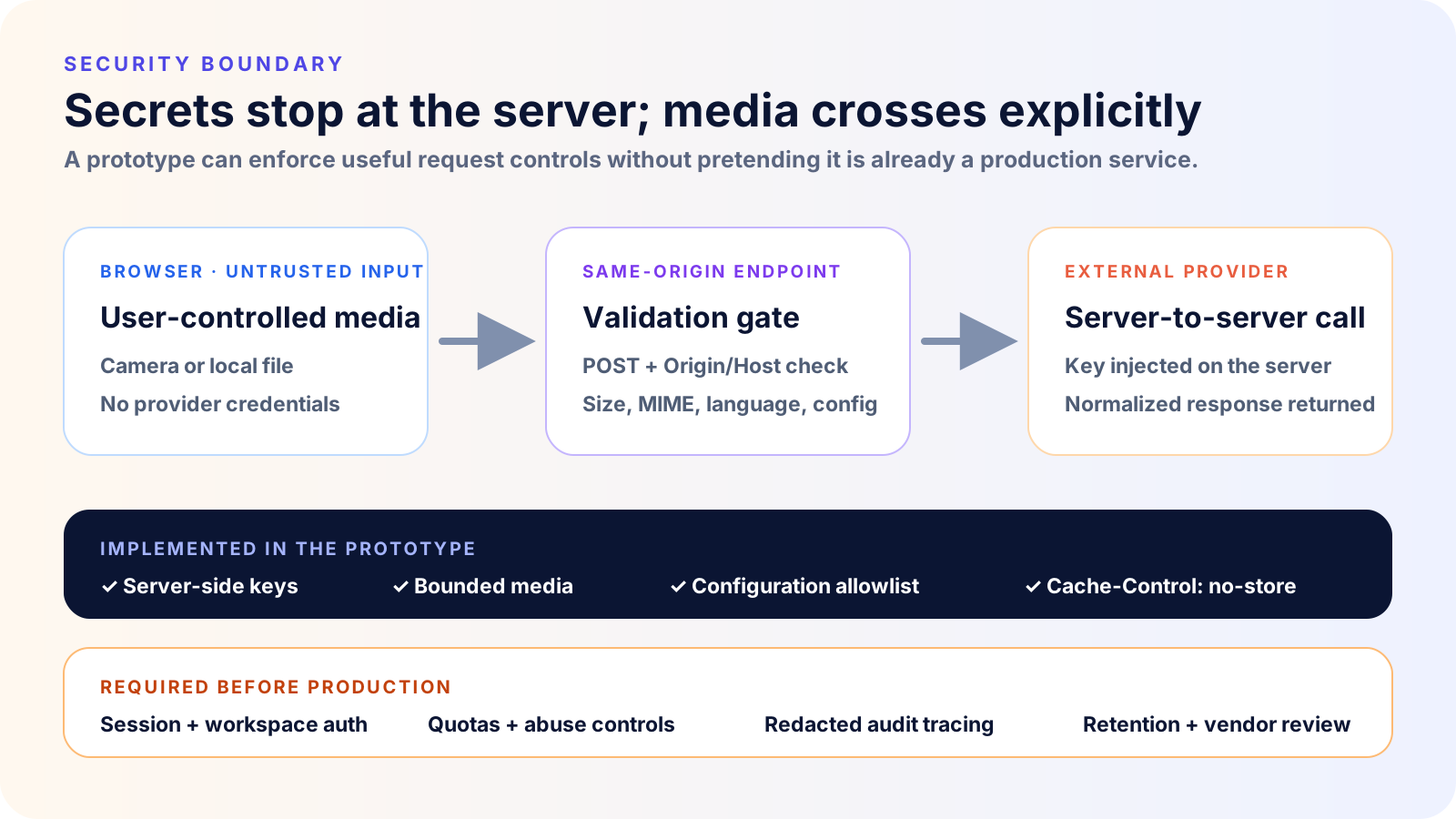
The prototype already applies several important controls:
- provider credentials exist only on the server;
- the endpoint accepts only
POSTrequests from the same origin; - image size, base64 length, and MIME type are bounded;
- target languages and provider configurations are reconciled against allowlists;
- the application does not log or return raw secrets.
Successful and error responses also set Cache-Control: no-store, and responses use X-Content-Type-Options: nosniff. These controls reduce accidental exposure, but they do not make a Vite middleware prototype a production backend.
The current UI sits behind the application’s existing login, yet the translation endpoint itself still needs explicit session and workspace authorization before production. That distinction matters: protecting a page is not equivalent to authorizing every API request. A production service also needs per-user quotas and rate limits, CSRF protection appropriate to the authentication design, secret rotation, redacted tracing, abuse controls, a documented retention/deletion policy, and vendor data-processing and residency review. OWASP’s File Upload Cheat Sheet is a useful baseline for hardening the upload surface.
Camera behavior also depends on a secure browser context and user permission. MDN’s getUserMedia() documentation
covers the browser security and permission model behind webcam access.
What we learned
The most useful outcome was the speed at which a broad product question became a testable workflow.
Codex could connect existing application context with browser APIs and multiple provider shapes quickly. That let us spend more time on choices a model benchmark cannot make for us: whether users prefer overlays or a rewritten image, how much provider detail to expose, how to communicate cost and processing, and where the security boundary belongs.
Three lessons stand out:
- Build the interaction, not only the API call. Product risk often lives between capture and result.
- Make architectural choices visible. Overlay and generated-image workflows have different latency, cost, quality, and trust profiles.
- Prototype quickly, then productionize deliberately. Fast implementation should create more time for authorization, abuse prevention, privacy, observability, and evaluation—not remove those steps.
For a broader look at productionizing AI-assisted workflows, see our MCP and Codex architecture guide . For related language workflows already available as products, explore the VoicePing event translation app and video translation .
The important speedup is not that code appears faster. It is that a product question becomes something users can test before the architecture hardens.