In this article
Learn how Codex Record & Replay turns a demonstrated macOS workflow into a reusable skill, with a practical VoicePing UI QA automation example.
Codex Record & Replay lets you show Codex a workflow once and turn it into a reusable skill. It is designed for work that is repetitive, preference-dependent, or easier to demonstrate than describe.
UI quality assurance is a useful example. An experienced reviewer knows which responsive states to test, what evidence is sufficient, which interactions are safe, and when an observation becomes a confirmed issue. Rewriting that manual QA workflow for every request is slow and easy to get wrong.
Record a Skill does not copy human intuition. It captures demonstrated steps and the reasoning you explain, then drafts an inspectable skill. The reviewer refines that draft and remains responsible for ambiguous decisions. The result is a human-in-the-loop QA standard that Codex can apply across future tasks.
This article shows how VoicePing turned one browser review into a reusable Codex skill for AI-assisted UI testing.
Record a Skill vs Goal mode
These features solve different problems:
| Capability | Purpose | What it preserves |
|---|---|---|
| Goal mode | Keep Codex working toward a verifiable stopping condition | The objective, validation loop, and definition of done |
| Record a Skill | Reuse how a task should be performed | The procedure, inputs, guardrails, evidence format, and final checks |
OpenAI’s Goal mode guide
describes /goal as a durable objective for long-running work. OpenAI’s skills documentation
defines skills as packages of instructions, resources, and optional scripts for reliable workflows.
They can be used together: the goal supplies persistence, while the recorded skill supplies the method.
What Record & Replay preserves
A good recording converts practical choices into explicit rules:
| Human decision | Reusable rule |
|---|---|
| Which states are likely to expose a defect? | Test specified viewports, toggles, selectors, and interaction states |
| What counts as evidence? | Preserve the original screenshot and pair it with measurements or browser semantics |
| Which actions are unsafe? | Stop before login, purchase, form submission, upload, or account changes |
| When is the review complete? | Require reproduction steps, severity, confidence, suggested fixes, and verified annotations |
Without a skill, those instructions must be remembered and rewritten. With a reusable Codex skill, the next prompt can contain only the changing inputs:
| |
The skill remains visible and editable. Teams can review its inputs, decision rules, safety boundaries, output format, and deterministic scripts instead of relying on knowledge held by one reviewer.
How to create and reuse a Codex skill
OpenAI’s Record & Replay guide recommends a short, complete demonstration. The VoicePing flow has four steps: select Record a skill, demonstrate the workflow, finish the recording to create the skill, and reuse it with new inputs.
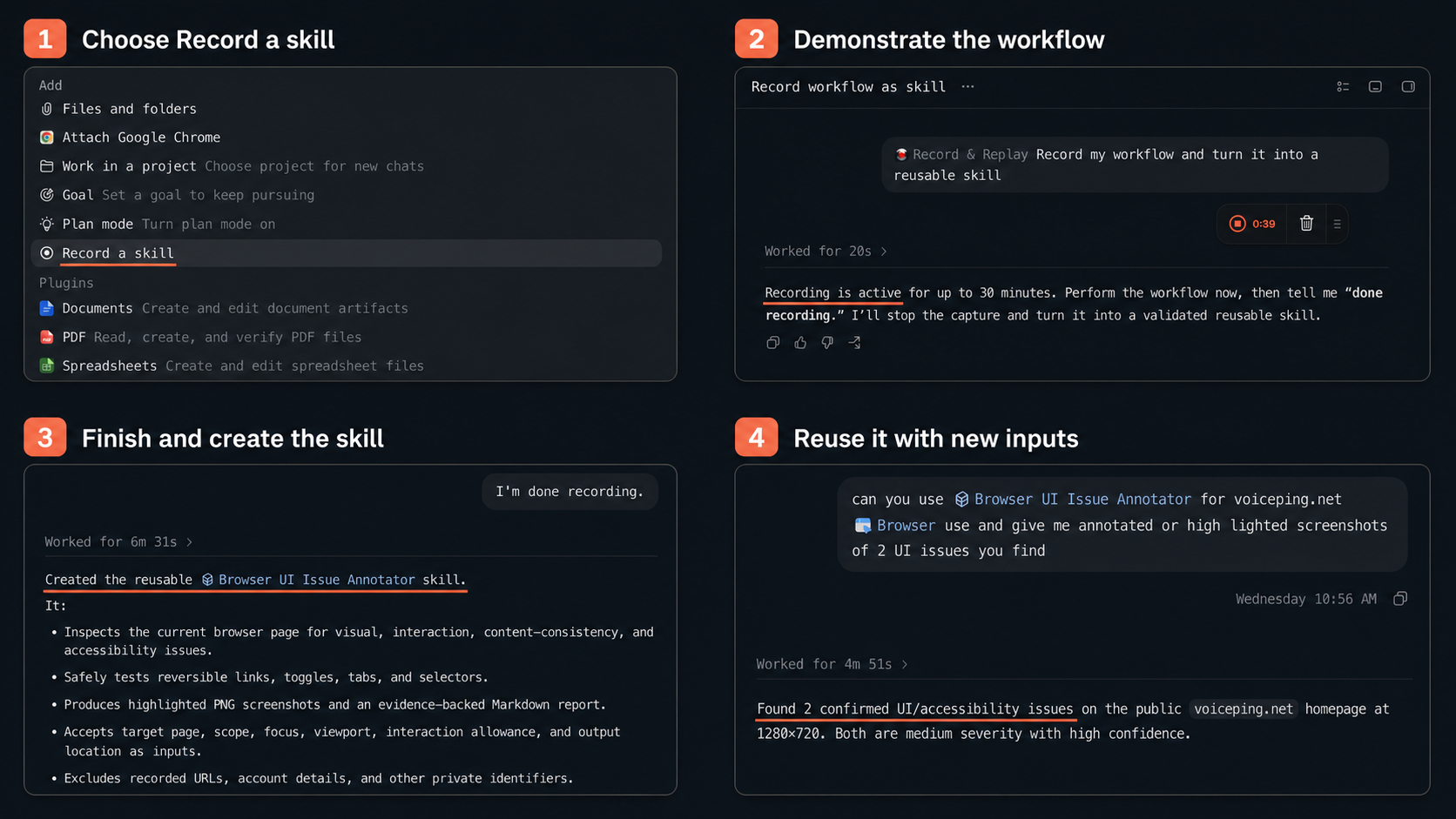
The complete Record & Replay flow, from recording a workflow to reusing the generated Codex skill.
Keep the demonstration short and complete. Use realistic but non-sensitive inputs, and update the skill when the product or QA policy changes.
VoicePing UI QA automation example
The demonstrated workflow asked Codex to:
Inspect a browser page for visual, interaction, content-consistency, and accessibility issues; test only safe and reversible states; preserve original screenshots; create clear annotations; and write an evidence-backed report.
The recording contained 38 events. Codex drafted the browser-ui-issue-annotator skill with:
- inputs for URL, scope, focus, viewports, interaction allowance, and output location;
- checks for overflow, clipping, interaction state, accessibility semantics, and related values;
- separate classifications for confirmed issues, concerns, and observations;
- boundaries around forms, logins, purchases, uploads, and state-changing actions;
- deterministic screenshot annotation from structured rectangle data;
- a report format with severity, confidence, reproduction steps, evidence, and suggested fixes.
The important output was not one report. It was a reusable UI QA method.
1. Demonstrate a real issue
The reviewer opened VoicePing pricing, selected Annual, changed the minute option, and captured the resulting overflow.
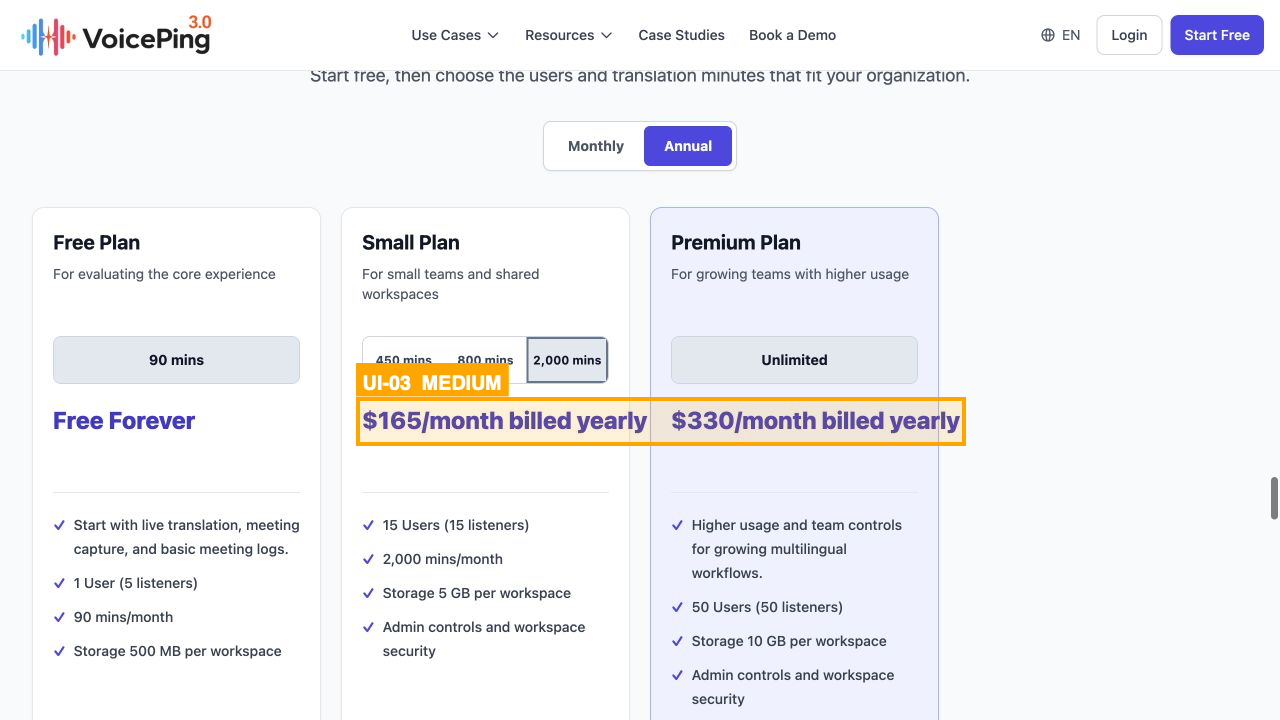
Figure 1. The demonstration records the triggering state, measurement, and annotation.
Voiceover:
“I am showing Codex the state that exposes the issue, the evidence to preserve, and what a useful annotation looks like.”
2. Reuse the skill
A new task invoked the skill with a short request. The review combined visual inspection with browser semantics and found that benchmark-card anchors were exposed as list items instead of links.
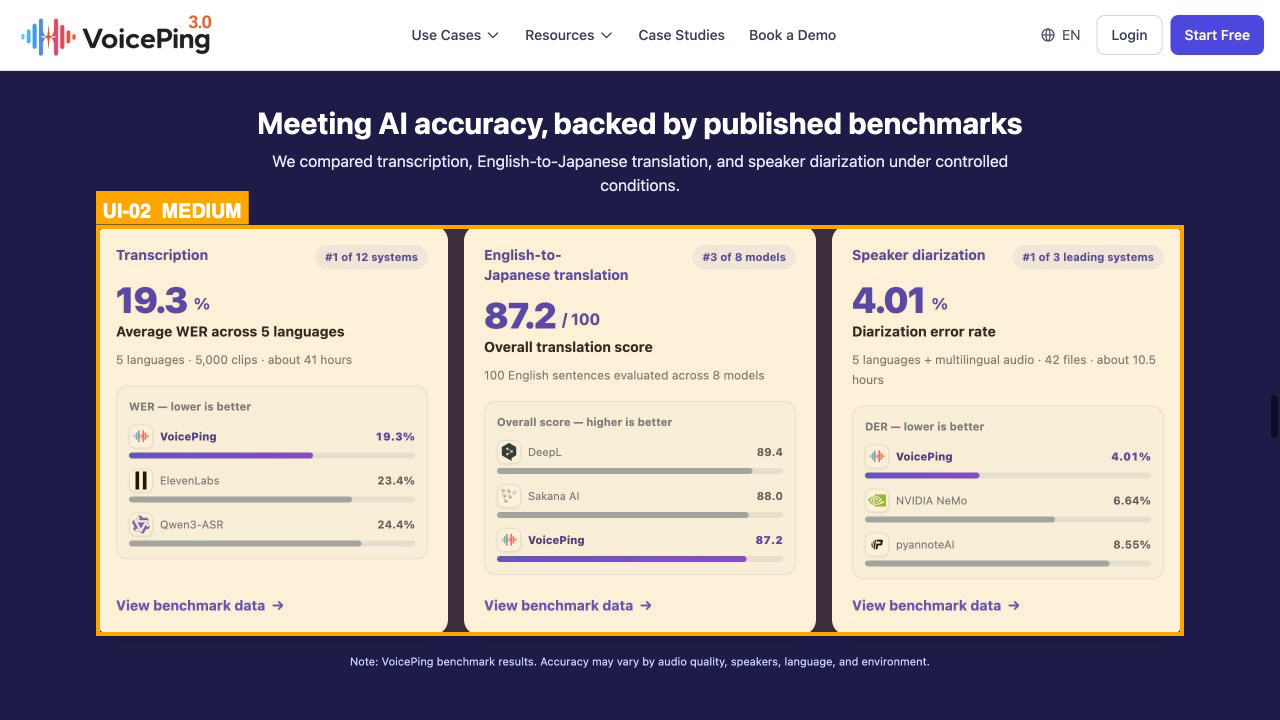
Figure 2. The report connects the visible region to reproducible browser evidence.
Voiceover:
“The prompt supplies the target. The skill supplies the inspection method and evidence standard.”
3. Pursue the full review as a goal
For the broader VoicePing pass, the reviewer supplied the established browser-ui-issue-annotator skill and sent the complete site review as a goal. The screenshot separates the two responsibilities: the skill defines the inspection method and evidence standard, while Goal mode keeps the larger objective active across multiple verified steps.
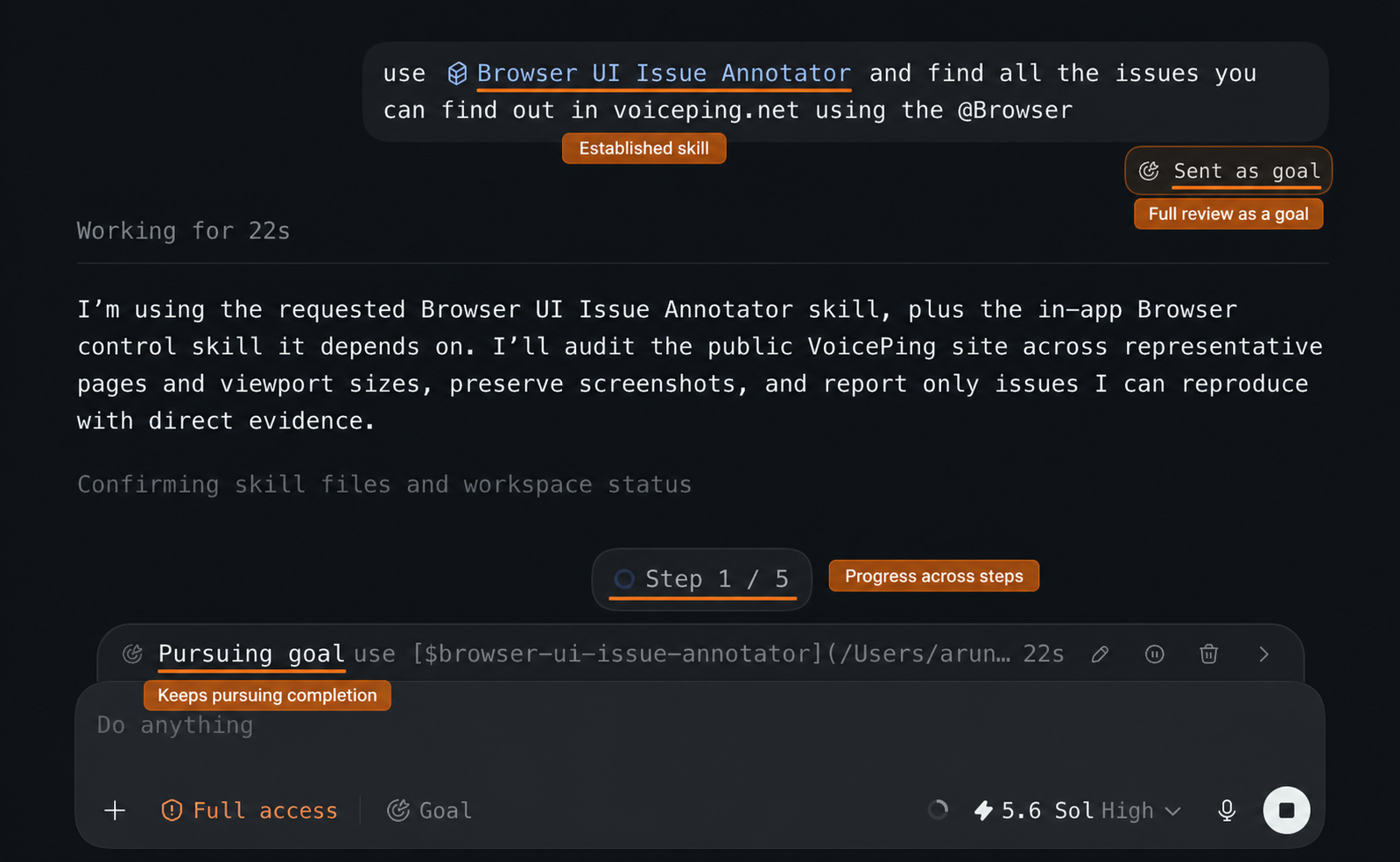
Figure 3. The recorded skill supplies the QA method; Goal mode keeps pursuing the full review and its completion checks.
Voiceover:
“The recorded skill supplies the QA standard. Goal mode keeps the full review moving until its scope and evidence checks are complete.”
What the two reuse runs demonstrate
The regular run and the goal-based run reused the same QA procedure under different task scopes. Each confirmed six findings, preserved original and annotated screenshots, and documented reproduction steps, scope, exclusions, and suggested fixes. Three defects appeared in both runs: autoplay without a pause control, annual-price overflow, and broken desktop dropdown interaction.
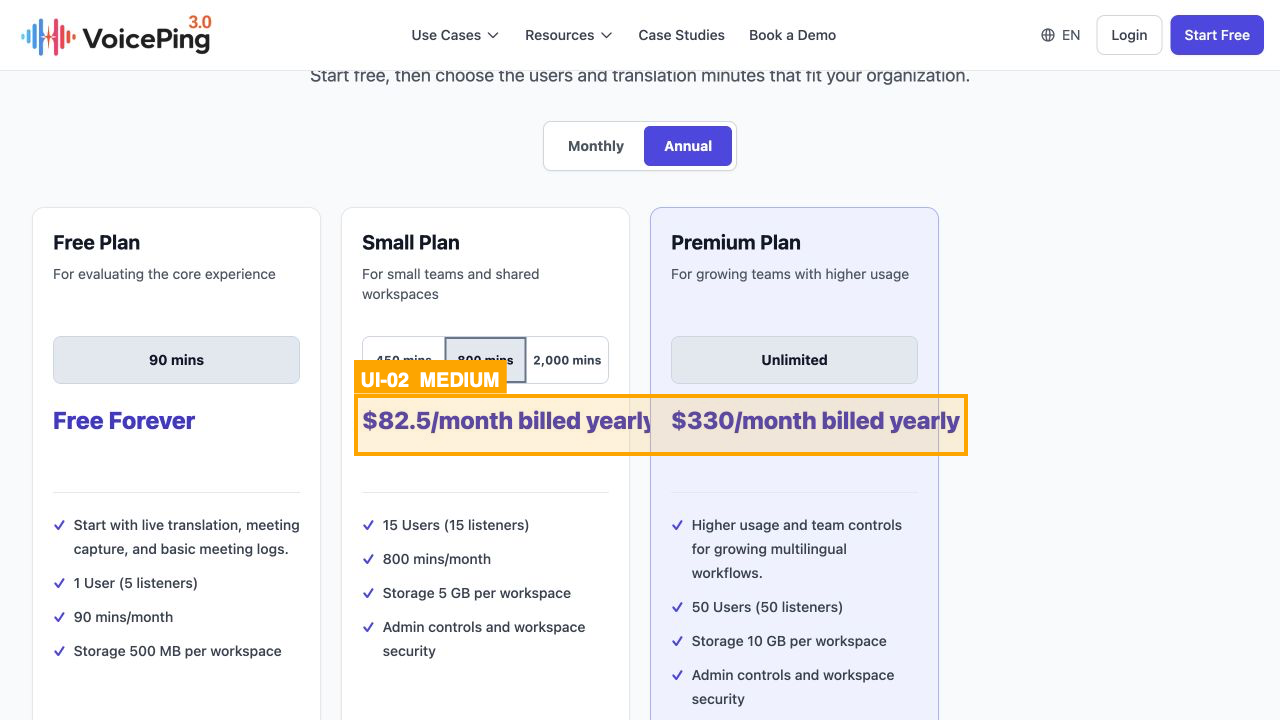
Figure 4. A second task reproduced the pricing issue under another selection.
Different coverage also produced different findings:

Figure 5. The explicit run applied the same evidence format to cropped artwork.
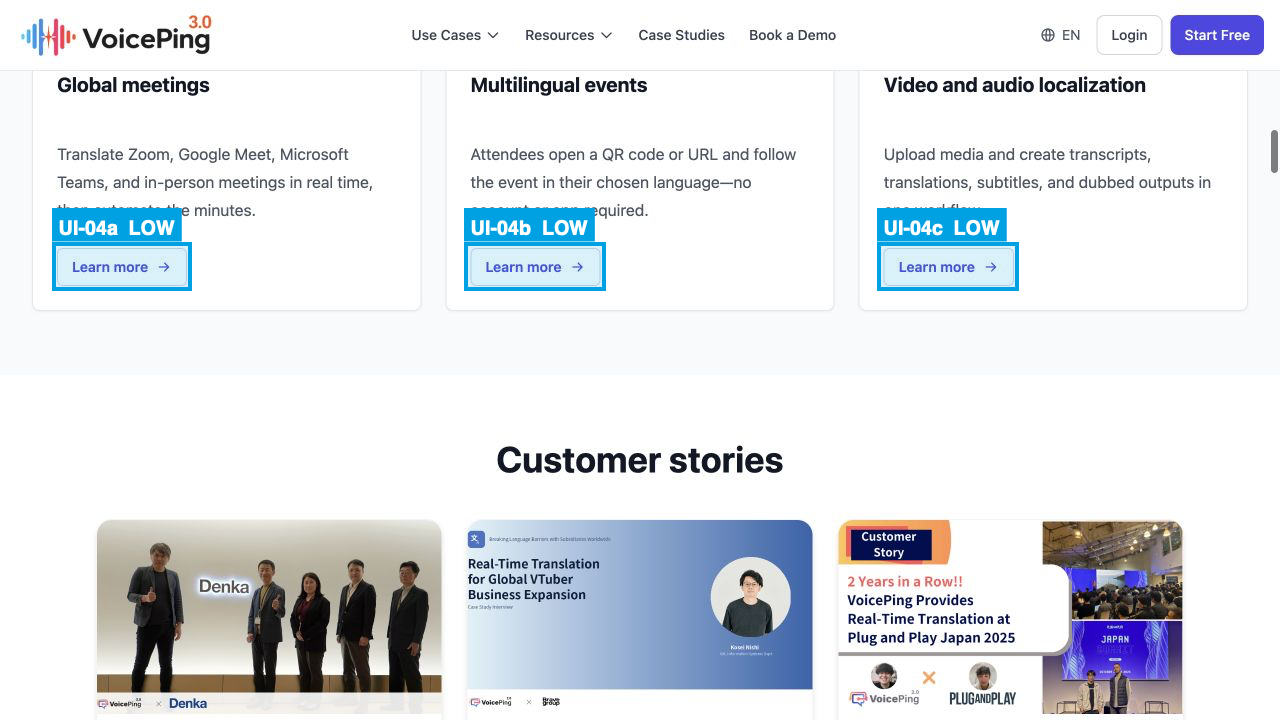
Figure 6. The second run recorded the triggering controls and stale URL.
This evidence demonstrates reuse of the QA procedure, not higher issue-detection accuracy. An accuracy comparison would require identical page state, scope, viewports, and a human-reviewed reference set for runs with and without the skill.
It also does not prove model-token savings. Browser inspection and evidence production dominated both runs. Reuse mainly shortened the human prompt and reduced the chance of omitting an instruction. A credible token comparison would require the same page state, scope, model, viewports, and output requirements in both runs.
The practical benefit is consistency: Codex repeatedly applies the parts of a manual QA workflow that the reviewer made explicit, while uncertain cases remain visible for human judgment.
When Record & Replay is a good fit
Use it when the task is repeated, the core steps are stable, preferences matter, and success can be checked. Examples include UI QA, correctly configured issue creation, recurring reports, publishing workflows, and other focused browser or Computer Use tasks.
Do not record a long, noisy session or a process dominated by one-off judgment. A skill should automate the repeatable procedure, not hide decisions that still require a person.
Conclusion
Codex Record & Replay turns a demonstrated workflow into reusable context. For VoicePing, it converted a manual QA process into an inspectable skill with consistent checks, evidence, guardrails, and reporting.
Show the workflow once, review the drafted skill, and reuse it with new inputs. Keep the human responsible for the standard and the exceptions.