In this article
At the Tokyo × Singapore Mixer on September 3, 2026, VoicePing displayed English and Japanese captions beside the presentation screens at Tokyo Innovation Base (TIB). The same setup served startup pitches and the live panel, while a QR code gave attendees another way to read the translation on their own phones.
VoicePing also provided an on-site operator. The work started before the talks—with the venue connection, equipment, and company-name dictionary—and continued through the program as the operator monitored the captions and coordinated technical support.
A program connecting Tokyo and Singapore’s startup communities
The Tokyo Metropolitan Government organized the mixer, with Enterprise Singapore as its partner, to connect the two cities’ deep-tech communities. The program combined talks, startup pitches, a panel discussion, and networking for startups, companies, investors, and ecosystem organizations. The organizer’s event page provides the program and speaker list.
| Event at a glance | Details |
|---|---|
| Event | Tokyo × Singapore Mixer — Where Tech Innovators Connect |
| Date | September 3, 2026 |
| Venue | Tokyo Innovation Base, Tokyo |
| Organizer | Tokyo Metropolitan Government |
| Partner | Enterprise Singapore |
| VoicePing’s role | Live translation and on-site operational support |
| Audience access | Venue monitor and QR access on personal phones |
The pitch lineup included Herbaferm, Pestroniks, and Formas AI. A panel followed, with representatives from ImpacFat, Accelerated Materials, and Leave a Nest Singapore. The translation setup needed to serve both prepared presentations and a discussion between speakers.
One translation service, two ways to follow the talks
At the opening, the host explained where to find the translation: on a monitor to the audience’s right, or on a smartphone by scanning the event QR code. This announcement made translation part of the event’s introduction, so attendees knew how to access it before the talks began.
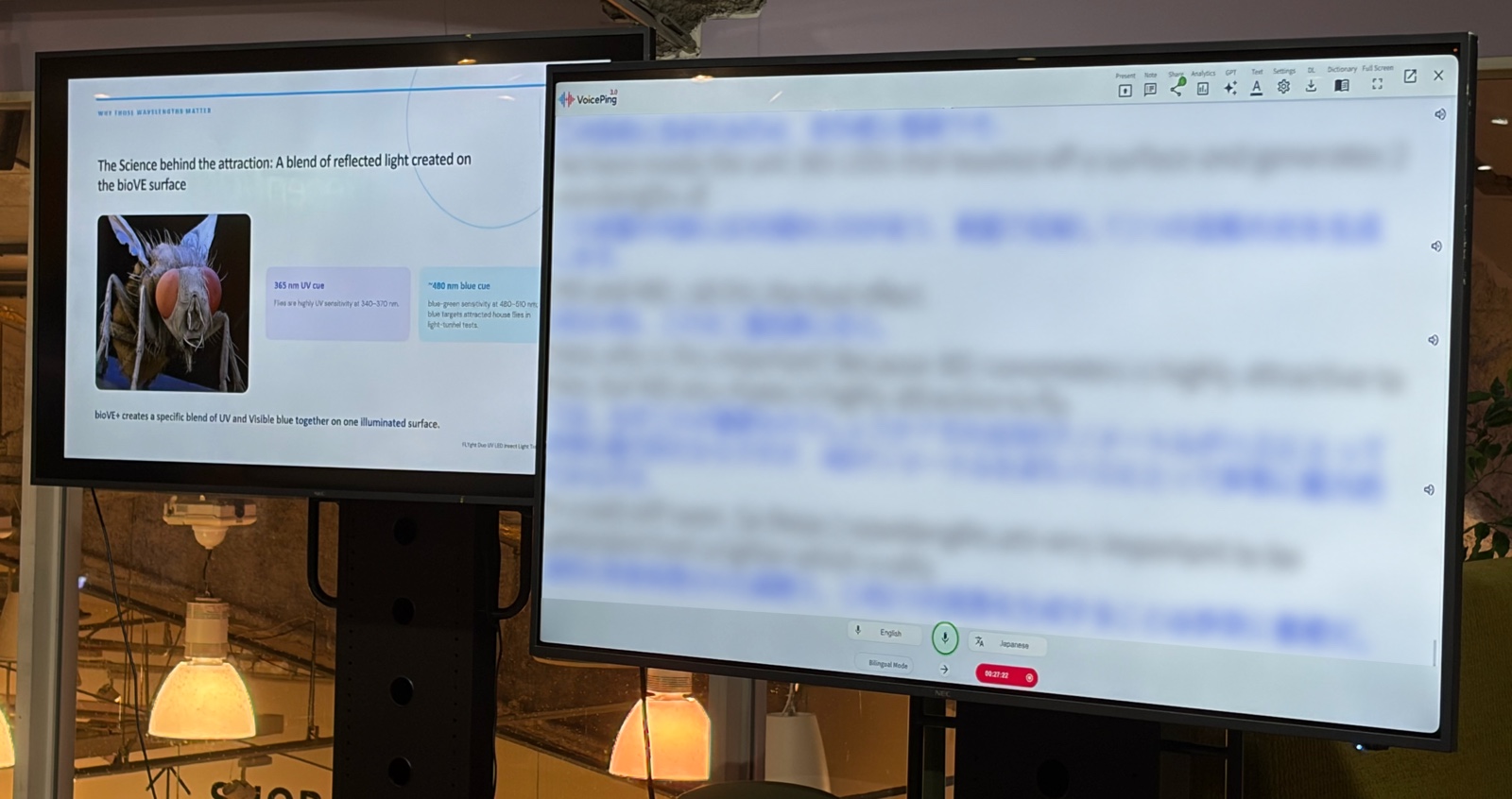
On the venue monitor: VoicePing showed English and Japanese text next to the presentation material. In the startup-pitch photo below, the slide and captions occupy separate screens, so the presentation keeps its own display area.
On their own phones: attendees could scan the event QR code and read the translation on a screen in their hands. The team had prepared and shared the listener link and QR image before the event.
The phone view complemented the shared monitor. Introducing both options at the opening gave attendees the access instructions before they needed to follow a talk.
VoicePing’s current Event Translation App supports this combination of venue captions and browser-based listener access. Attendees can open the event link without installing an app or creating a VoicePing account.
Preparing the names speakers would use
During setup, the on-site operator was asked to add five company names to the dictionary. The operator asked the organizers to say the names aloud, checked how they appeared in the transcript, and began updating the entries.
The operator checked the spelling against the pronunciation and the resulting captions. This mattered for a program introducing unfamiliar companies: an incorrect name can make it harder to connect what a speaker says with the event agenda.
After the event, the operator reported that the organizer’s contact wanted to provide the dictionary material in advance next time. The practical lesson is to collect speaker names, company names, product terms, and pronunciations before rehearsal, then check them using the event’s microphones and presentation material.
VoicePing’s Workspace Dictionary for events supports preferred names and terminology. Preparing entries helps the operator address known vocabulary; it does not remove the need to review the resulting captions and transcripts.
Supporting the setup and responding during the event
The operator brought a laptop, adapters, cables, and a charger, and arranged a wired internet connection at the venue. During the program, the operator watched the translation service and stayed in contact with the remote team.
Early checks reported quick translation, but service interruptions occurred later in the program. The on-site reports described sign-in delays and captions that were delayed or stopped updating. The operator escalated those symptoms to the remote team, which investigated and reported service restoration.
For organizers planning a similar setup, rehearsal should include the view from the audience seats and the phone listener page. The event plan also needs a named person to monitor captions, an escalation contact, and a way to communicate an interruption to attendees.
Reviewing the sessions after the talks
The team retained transcript exports and audio for two sessions. These records made it possible to review the opening access instructions and the language captured during the program.
They also showed why names need an editorial check. Some company and organization names appeared differently in the automatic transcript and summary from the official program. For a record that will be shared after an event, the speaker list and approved glossary remain useful references.
This case study draws on the event program and VoicePing’s operational records. Attendee comprehension and satisfaction were not measured in those records.
A shared program, then time to connect
At the close of the talks, the host invited attendees to meet the Singapore-based startups in the networking area. VoicePing’s role in this case was to support the shared presentation program leading into those conversations, through venue captions and phone access.
What organizers can take into their next event
The most useful decisions in this setup were concrete: where to put the caption monitor, how to introduce phone access, which company names to prepare, and who would respond if the service needed attention.
For a similar event, make these decisions before rehearsal:
- Where attendees will read: choose the monitor position and check the view from the seats; prepare the phone access link and the host’s announcement.
- Which names need preparation: collect the agenda, speaker and company names, product terms, and pronunciations while there is time to check them.
- Who will monitor the service: test the venue connection, assign an operator, and agree on an escalation and attendee communication plan.
- How records will be reviewed: check names against the approved program before sharing transcripts or summaries, and follow the organizer’s media permissions.
For other perspectives on event translation, read how Startup Island TAIWAN used QR access at a matching event and how Plug and Play Japan combined venue screens with on-site support .
Explore VoicePing for international events to discuss venue captions, QR access, terminology preparation, and remote or on-site support.